Quick answer: A keyword rank tracking tool checks where a website ranks on Google for chosen keywords, by location and device, and shows how those positions change over time next to competitors. For an agency, it is the proof that SEO work is moving clients up, and the source of the rankings section in every client report. Our agency rank tracking tool does this with white label ranking reports.
Key takeaways
- A keyword rank tracker monitors where your pages rank on Google for the keywords you choose.
- Tracking rankings shows search trends and whether your SEO work is paying off.
- When choosing a tracker, check city-level tracking, update frequency, competitor tracking and reporting.
- SEO Audit Software checks the top 50 Google results for each keyword: plan keywords update weekly, and extra keywords can update daily.
Get your keywords position monitored using Keyword Rank Tracking Tool.
If you’re doing SEO, you must know that keywords play a fundamental part in SEO.
Every second 99,000 searches happen on Google. That means per day 8.5 billion searches.
People use words or key phrases to make that search happen. Those keywords build connections between your website with the user.
So if your website is not well-optimized, it is difficult to be featured on search engine result pages.
For that matter, it’s important to keep track of your SEO strategy as well as your keyword rankings.
You should know how your keywords and optimization efforts are working. For an agency like yours, it becomes essential.
As search engines are the main source of traffic for websites. Business success depends on how they rank on Google.
As you know it’s a very competitive field. So for a digital agency, you must keep track of your every effort.
That’s when SEO tools come in handy. It is actually difficult to track & monitor every keyword every day. But the Keyword rank tracking tool makes it pretty simple & faster for you.
It is also your best friend to impress your SEO clients & help them to outrank their competitors.
In this article, you will learn how the Keyword rank tracking tool is a blessing for your agency. So without further delay, let’s start from the beginning.
What is a Keyword Rank Tracker?
A keyword rank tracker is defined as a tool that is designed to accurately track your keyword ranking positions on the Google Search engine result pages.
Why Do I Need to Track keywords?
Well, an online presence is important to keep your business on track. And continuous monitoring & keyword ranking will help you to achieve that. By doing so you can easily detect search trends & what your target markets actually demand.
With that knowledge, you not only improve the chances of reaching out to the target market online. But also it will help you to find out which market strategies are actually working and which are not.
Monitoring a large segment of keywords will help you to improve your posts or update your web pages that actually are not ranking well.
You can also get a chance to know the most trending keywords of your services & products. By keeping an eye on these, you can actually gain more popularity while improving your keyword rankings. That ultimately moves your website from page two to page one on the SERPs.
All of these can be easily achieved by using a good keyword rank tracking tool. By spending less time you can find keyword statistics & more analyzing reports.
How does a keyword rank tracking tool help?
A keyword rank tracker tool makes your keyword maintaining & monitoring task so much easier. It lets you monitor your Google rankings on desktop as well as mobile around the globe.
The reason why your agency needs a keyword rank tracking tool is because:
It allows you to track your website’s target keyword rankings in the Google top 100 organic & paid results.
Daily updated ranking data helps you to scan your optimization efforts. That results in improving the keyword rankings progress both in paid & organic search over time.
You can also know your SERPs competitors’ keywords rankings. You will get a side-by-side comparison between your competitor’s ranking data and yours.
You can track your keywords at any location at any time.
You can generate a keyword ranking report and download the PDF report by selecting the first two competitors.
The keyword tracking tool helps you to see your efforts. Whether it delivers expected results or not. By using the metrics you can easily make necessary changes by implementing specific keywords. Also adding anchor text for internal linking to different pages improves your landing page rankings.
Keyword rankings help to find opportunities to generate more conversions through your website content. As of now, you know which high-converting post isn’t ranked. So you can easily drive all your focus on that post to rank higher instead of those which already convert well & have good rankings
When your highest-traffic post drops from position one to page two, you are able to identify the issues & can immediately start working to re-optimize that page to recover that lost rankings. Rather spend time finding the causes of ranking loss.
And many more. But to achieve all of this you need a good Keyword rank tracking tool. Below I mentioned the elements of keyword rank tracking tools that you must examine before paying for them.
Tracking capability of the tool:
- Can you track down to city/local level keyword rankings?
- What is the frequency of updates of the tracking results? Daily or weekly?
- Will it allow you to track down the competitors’ keywords rankings?
Dashboard of the tool:
- Will it provide comprehensive data & metrics regarding the keyword rankings?
- How well the information is presented in the dashboard as well as in the report?
- Can you get the keyword ranking report?
Notification:
- Will the tool alert you about your keywords position changes?
- Can you generate weekly/monthly keywords ranking reports?
- Is there a white-label report option available?
After sorting out the questions, it’s time to explore the best keyword rank tracking tool for your agency.
SEO Audit Software: Keyword Rank Tracking Tool:
This rank tracking tool is built with focusing on comprehensive rank tracking functionality.
Keywords ranking data are fetched directly from Google. So you’ll always get the most accurate Google keywords ranking result.
To narrow down your selection here is some functionality of this tool.
Dashboard:
SEO Audit Software dashboard contains all the important rank tracking data in the most convenient manner.
This position tracking tool lets you monitor national, regional & even local search engine positions for any keywords.
Your plan’s keywords are checked every week, on Monday, and extra keywords can be checked daily with the daily add-on. It’s pretty simple to use.
Once you log in yourself into the app.seoaudit.software. You will get yourself entered into the software dashboard.
On the left, you’ll get a list of tools that this software has. Go to the “create a project” section (Keyword tracking → Add project in the current app). It works in a few simple steps.
- Add Project:
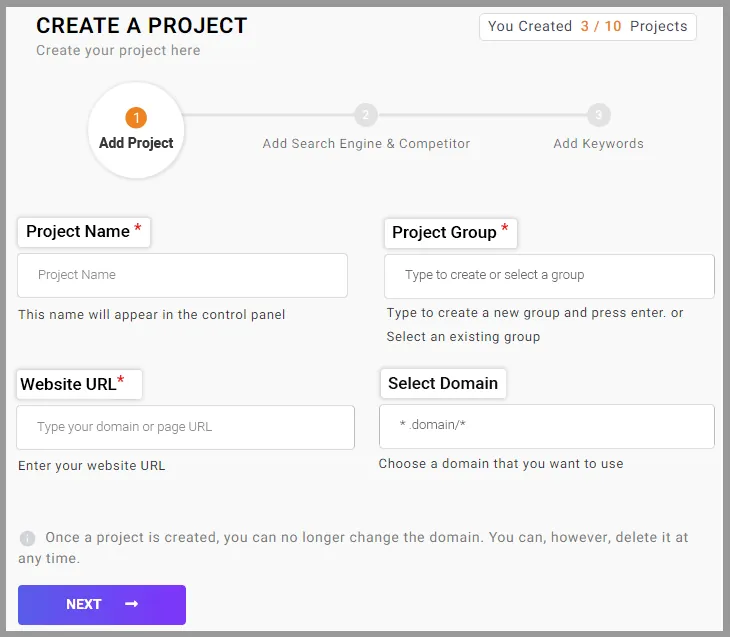
Define your project name, group, website URL, and choose the domain.
Once you have defined your project, the domain can no longer be changed. However, you have the option to delete it at any time.
- Add Search Engine & Competitor:
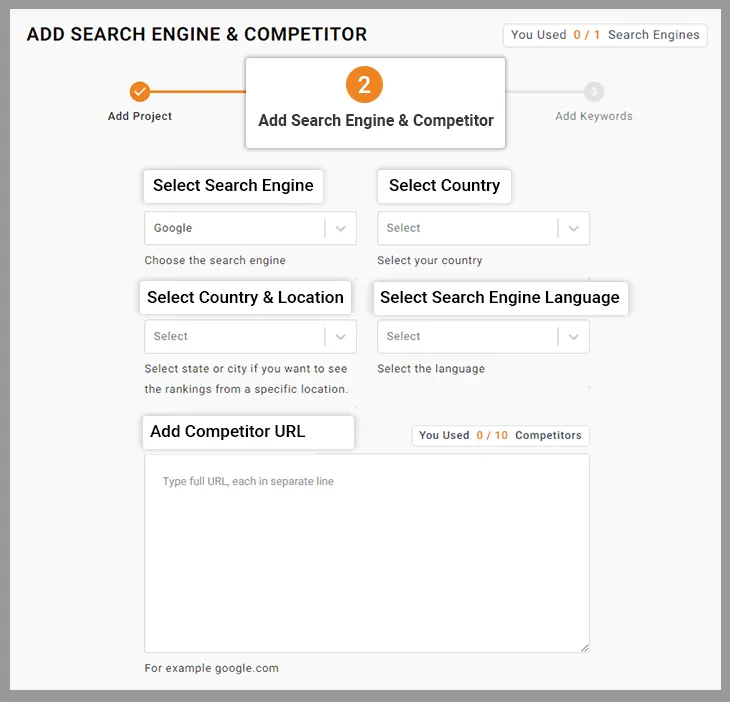
Now you move to edit your preferred Search Engine & Competitors. Select your preferred search engine, country, location, and language here. Here you can add competitors’ URLs; how many depends on your plan.
- Add Keywords
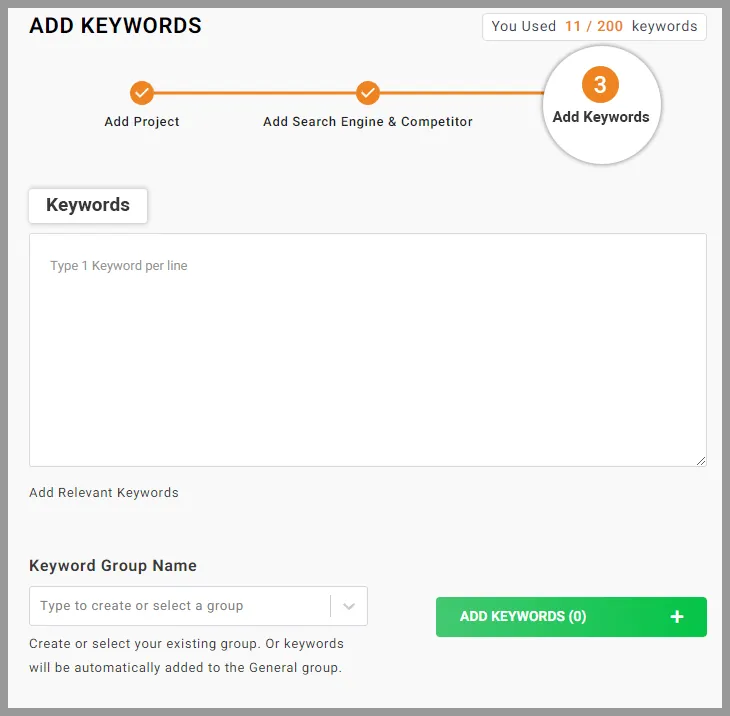
In step 3 which is ‘Add Keywords’ mention the keywords, you want to track. Then type to create or select a group name for the keywords.
- You can organize all of your keywords in groups. That helps you to divide each keyword & organize them into categories so that you never get lost.
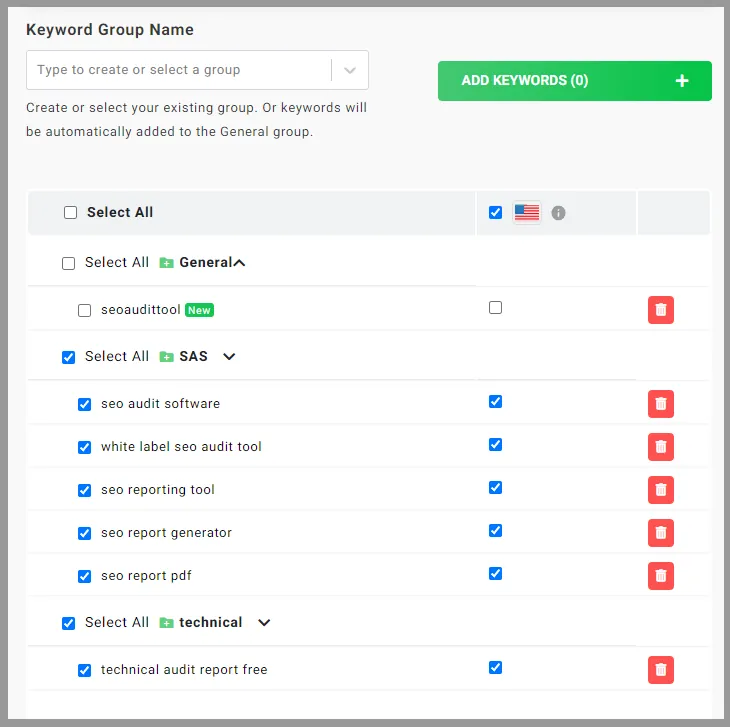
- Add Project:
After the keyword add and submission are done, you’ll move to Keyword Tracking Site List. Here you will get an overview of all your keyword ranking data sets based on different locations, search engines, and languages. For eg., you will know the average position, Top 5, Top 10, and Top 30 list of the keywords. So you’ll always get the most accurate Google keywords ranking result.
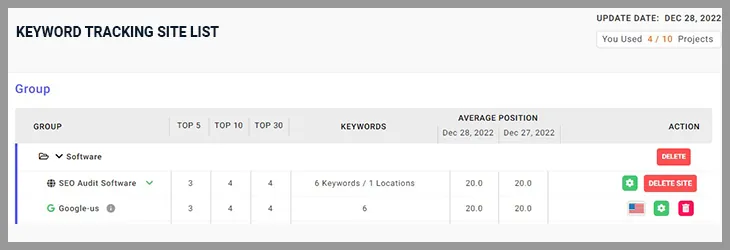
For a more detailed overview. Click on the view ranking.
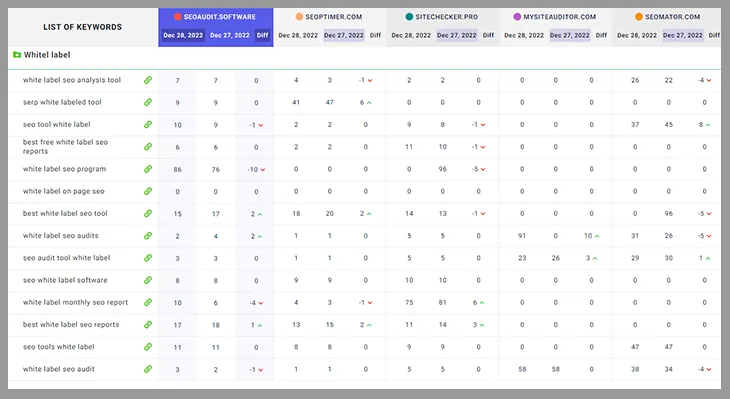
In this screenshot, you can see the mention of the time frame. This time frame compares the current positions of keywords with the previous periods. For eg: This data is from May 07, So with the current data, you’ll also get May 06 data. And get the ranking difference between them. You can also filter the date by selecting which date ranking data you wish to check. However, keep in mind that if you want to look at data from the previous month but haven’t started using the tool yet, there won’t be any. Your ranking data will start to fetch only after you create the project with the right keywords.
Not only your ranking data, but you can also see how your competitors are performing on your targeted keywords. The side-by-side comparison makes it easier to see what you’re missing. As a result, you can begin strategizing your next keyword aim based on the data.
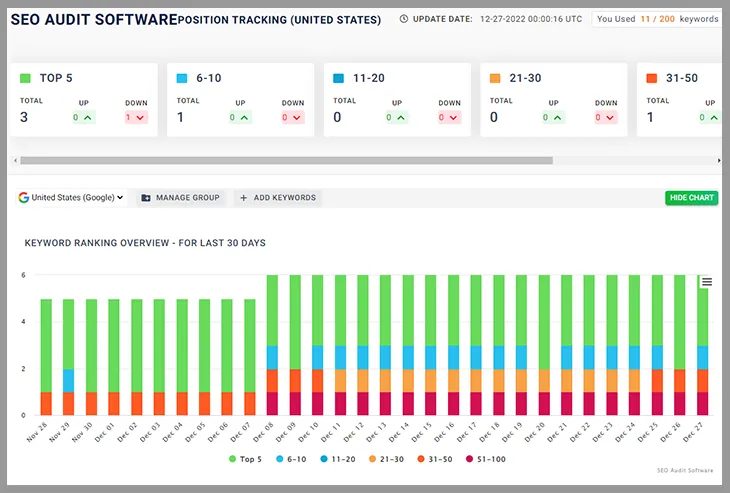
The data can be sorted by ranking. You can, for example, look at the data simply for specific rankings. From 1 to 5 to 51 to 100, you can sort out any parameter.
Discover which of your keywords rankings are on an upward or downward trend at a glance.
You can monitor the rank position on a chart. So you can easily visualize which keywords are working great for you. Use this information to fix the issue and improve your rankings.
You can also run map scans to see how a local business ranks on Google Maps.
You can track keywords rankings & generate the data without spending any money for 14 days.
You can also generate white-label keyword ranking reports. And with the help of white label now you can impress your clients with the up-to-date ranking report.
Here you can add SERP competitors (how many depends on your plan) from whom you want to get valuable search insights. With the help of data & metrics, you can easily find out your gap for improvement & gain a competitive edge.
What’s new in 2026: keyword tracking in the current app
The screenshots above show the earlier version of the app. Today you open Keyword tracking, click Add project, and set the site, the device (desktop, mobile or both), the locations, the keywords (with optional groups) and up to 5 competitor websites. The first check usually takes 2 to 5 minutes, and the app checks the top 50 Google results for each keyword. Plan keywords are checked every week; extra keywords can be checked daily with the add-on. The full setup is in create a keyword project. For local clients, a map scan shows rankings on Google Maps at 25 points around a business.
Notification Alert:
When it is time for alerting you, this tool is pretty handy. The app shows a “Rankings ready” notice when new positions arrive, and the project page shows how each keyword moved since the last check.
Pricing:
As you already get the chance to use this tool completely free for 14 days. You have plenty of time to decide whether or not to use this tool.
And when it comes to the subscription plan, this tool kept the pricing table pretty favorable for the agency user as well as for the SEO professionals.
This tool offers five plans, from Starter to Enterprise, with more keywords and features on higher plans.
Every plan includes tracked keywords with weekly updates, competitors and locations. How many depends on your plan: see the pricing page.
Higher plans include more keywords, websites, competitors and locations.
You can add more keywords on any plan, with weekly or daily updates.
This tool also gives you the opportunity to customize your pricing & features. Choose the plan that is suited best to your needs.
Lastly, this tool is super easy to navigate. There are plenty of options you can choose to get your data.
If you’re just starting out & have an agency, this tool is best for you. You can tailor all your keyword ranking requirements by using this tool. It will eventually value the money that you’re going to invest. And got to see how your keywords are performing.
So if you’re in need of a robust SEO platform that gives rank tracking solutions – SEO Audit Software is the one you should go for.
Want to share rankings and audit results under your own brand? See our white label SEO reports.
Frequently asked questions
How often should an agency check keyword rankings?
Weekly is enough for most client keywords, because single-day moves are often noise. Use daily checks for a short list of money keywords, or during a migration.
Why do my own Google results differ from the rank tracker?
Your own results depend on your location, device and search history. A rank tracker checks from a set location and device without personalization, so it is the better baseline for client reports.
Should I track desktop and mobile rankings separately?
Yes, when mobile traffic matters, because Google ranks them separately. Each keyword then counts once per device and location. See how tracked keywords are counted.
Can I share keyword ranking reports with clients under my brand?
Yes. Rankings can go into white label client reports, sent automatically every week, month or quarter. See how to schedule client reports.