Quick answer: An SEO audit improves Google rankings by finding the problems that stop search engines from crawling, understanding or trusting your pages, such as indexing errors, slow loading, broken links, weak titles and thin content, so you can fix them in order of impact. The audit itself does not change rankings; the fixes do, and Google needs time to recrawl and re-evaluate the pages you changed.
Key takeaways
- An SEO audit assesses how your website performs on search engines and finds what holds it back.
- A technical SEO audit helps search engines crawl, understand and rank your pages.
- Work through the audit checks one by one rather than trying to fix everything at once.
- Regular audits stop new technical issues from building up.
You may have heard that SEO potentially takes 9 to 18 months to show results for a fresh new website. But some SEO mistakes can delay this process even further.
There are 200+ ranking algorithms. And each algorithm carries a weight to boost your Google rankings.
To find out whether your website follows all the critical Google Algorithms. And to know and solve all the SEO errors you need to do an SEO Audit.
Doing regular SEO Audits help you to achieve major SEO milestones. Consistent audits ensure consistent results.
On that note let’s dive into the technical SEO Audit checklist that you can do to boost your Google Rankings in 2026.
Before starting there are few things you need to remember.
- Do you have the in-house expertise to improve your SEO?
- How well does your competition perform in terms of SEO?
- What is the current state of your site?
- What are you attempting to gain from an SEO audit?
Now, let’s find out the checklist to cover for a proper technical SEO Audit.
Before going through each of the checklists, first, begin with the lighter part.
What is an SEO Audit?
An SEO audit is a process of assessing your website’s performance on search engines.
It is an excellent approach to develop practical plans to outperform your competition. Identify possibilities inside your website. Identify and address all the technical issues. In the end, develop better client experiences.
Technical SEO audits, on-page SEO audits, and off-page SEO audits all should be performed on a regular basis.
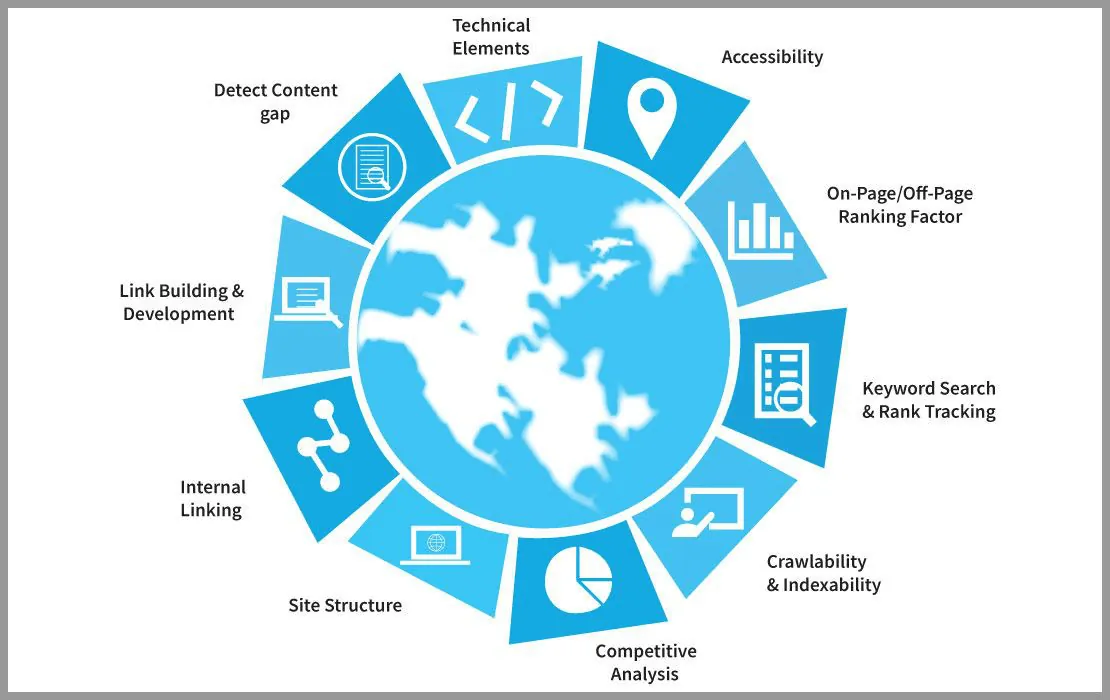
While moving forward with the technical SEO Audit you will discover the improvement areas. By optimizing and resolving, you can readily boost performance.
You can not resolve all issues in one go. But by doing SEO Audits you will have a vast idea of what’s going wrong with your website. And then design a plan accordingly.
There are three most important elements that need to be considered during a technical SEO Audit:
- Content, Images, Keywords, Heading Tags (Front-end components)
- Hosting, Indexing (Back-end components)
- Link quality and other external resource analysis
There are many important factors involved that need to be examined during Technical SEO Audit, other than crawling and indexing.
Such as,
- Page Speed
- Mobile-friendliness
- Crawl errors
- Link health
- URL Structure
- Duplicate Content
- Canonical Tags
- Site Structure
- URL Structure
- XML Sitemaps
- 404 pages
- 301 redirects
When performing a technical SEO audit, avoid over-optimizing. Too many changes can sometimes do more damage than good to your SEO rankings.
Why do we need to do a Technical SEO Audit?
Doing a technical SEO audit is important since it helps search engines better analyze and categorize your website. In return, it helps to rank you better for the relevant search queries and receive relevant traffic.
It helps to find out the issues that prevent search engines from crawling and indexing your site.
It doesn’t matter how well-inputted your contents are. If your site is not performing well. You’ll be the loser of a hell of a lot of traffic.
Without it, your site may be facing crawling and indexing issues. Although your site is discoverable. Still, there are loading issues, user-experience issues, and complex navigation. And that is enough to be detrimental to your image online.
Testing all of the technical parameters on a regular basis helps you detect and correct them quickly.
Moreover, there’s no hard and fast rule about how to do a Technical SEO Audit correctly.
Hence the steps outlined here are comprehensive.
Before jumping on the SEO Audit, let’s do a quick SEO Score Check.
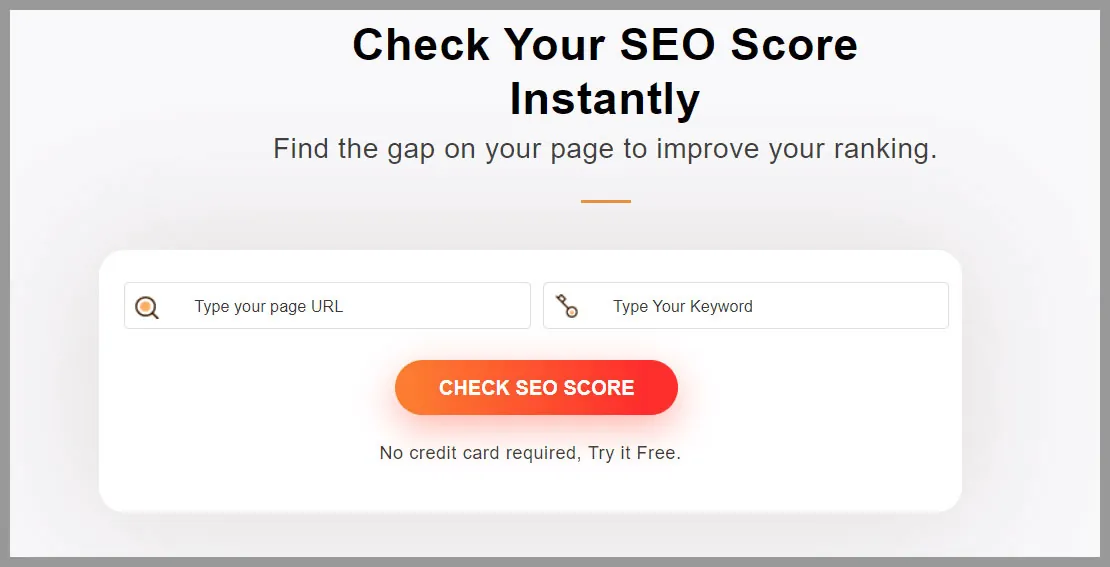
Check Your SEO Score Instantly
Find the gap on your page to improve your ranking. Check SEO Score No credit card required, try it free.
Now Let’s start doing the Technical SEO Audit
Hundreds of ranking factors make any SEO Audit successful. But it’s important to scrutinize every aspect you are considering here. Your objective here should be making a flawless decision while doing an SEO Audit for your website.
There’s not a proper order of steps that you need to follow. Simply begin with the steps that you now require more of.
For doing the Technical SEO Audit we mostly took help from SEO Audit Software and some other Google suggested tools for the accuracy of results.
1. Find out your Website Strategic Objectives
Before starting you need to think about your long-term goal. Step 1 of doing an SEO Audit, is to find out what you want to achieve through it.
Clear objectives help you to set more focused SEO goals. There are some examples of SMART SEO goals
- Increase your organic search visibility
- Grow your brand value online
- Grow your organic lead volume
You can set objectives from the SEO and business perspectives. And you need to be clear about the goal. The rest of the journey will be like walking in the park. P.S: Not really! But we’ll see.
2. Find out the website Indexing and Crawling Issue
It’s time to find out if your site has any indexing issues. Here Google Search Console will help you.
Just login to Google Search Console → Index → Coverage.
You will find how many pages are not indexed or in the warning list or at the excluded list.
The below screenshot shows some suggestions from Search Console.
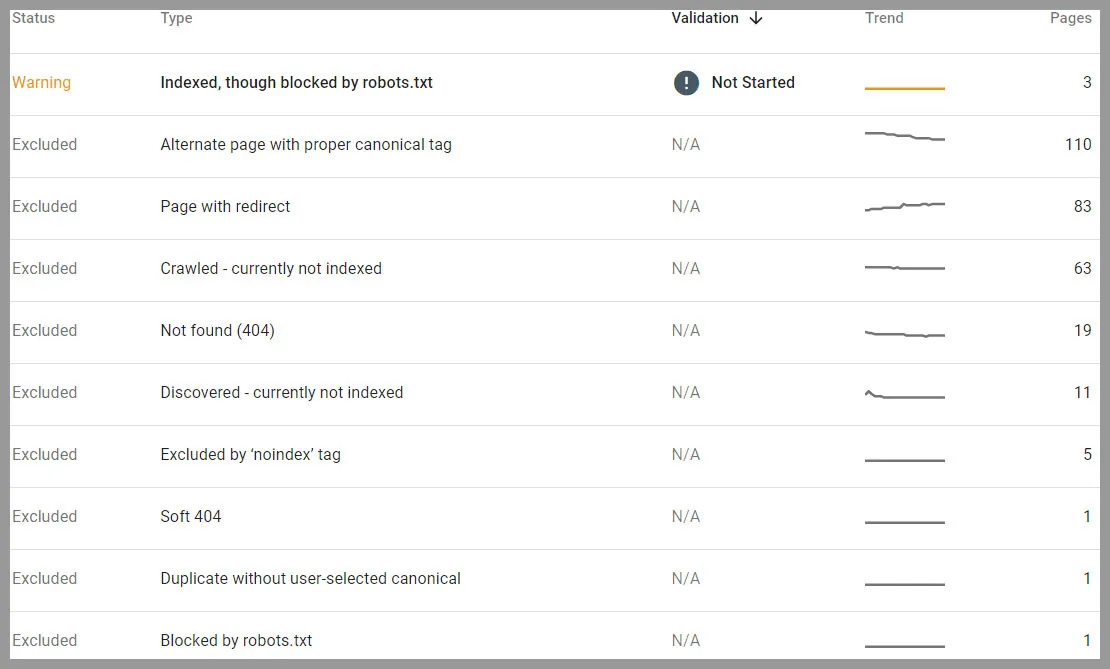
So if you see any page that is not indexed or crawled by Google, you will know now why.
Make sure Your Right Site is Crawlable
What this means is that your website may have many versions, one of which is now visible in search engines.
It could be because of warnings in the mobile and desktop versions. Alternatively, for an HTTPS version and a non-HTTPS version.
Try to find out the actual reason and work to resolve it. By doing so, you won’t confuse search engines with mixed instructions.
Also, because we’re discussing HTTPS vs. non-HTTPS. Make sure you’re using an HTTPS site. Without SSL security, Google will flag your website as “Not Secure.” It has a detrimental effect on your overall SEO.
So your site needs to use the HTTPS version only.
3. Find out the Robots.txt files to resolve Technical SEO Issues
In continuation of the previous step, find out which page accidentally has a Robots.txt file. It instructs Google which page to crawl and which not.
Before understanding Robots.txt, you need to understand how crawling works.
Crawling on your site occurs across links to move from one page to another.
The search crawler will look for a robots.txt file before crawling at a website. If your site has one, the crawler will read it before proceeding through the page. The robots.txt file contains information on how the search engine should crawl. Each rule either prevents or allows crawler access to a specific file path on your website. Unless you declare differently, all files will be initially crawlable. Crawlers support these four directives.
- User-Agent
- Disallow
- Allow
- Sitemap
If the robots.txt file has no instructions, the search engine will simply proceed to crawl other information.
The main point of all these explanations is to do testing. Check your robots.txt files and always be notified whenever any changes occur. Cause accidental changes can de-index your site and it will greatly hamper your ranking.
For testing, you can use robots.txt Tester. For advanced use, try out Google’s open-source robots.txt library. It is used in Google Search.
To give instructions to search engines for not showing a page on SERPs, we recommended using robots meta tag or Noindex attribute. Add the robots meta tag & Noindex attribute () in the header section and your robots.txt file.
So now you won’t accidentally be giving any wrong instructions at the robots.txt file.
4. Find out the Loading Speed
One of the most important ranking factors, optimizing the website page speed and loading times.
Your page fully loaded time should be less than 2s. You can check your site loading performance at PageSpeed Insights.
Same as SEO Audit Software which is powered by Google lighthouse. Here you will have lab performance data for both the mobile and desktop versions.
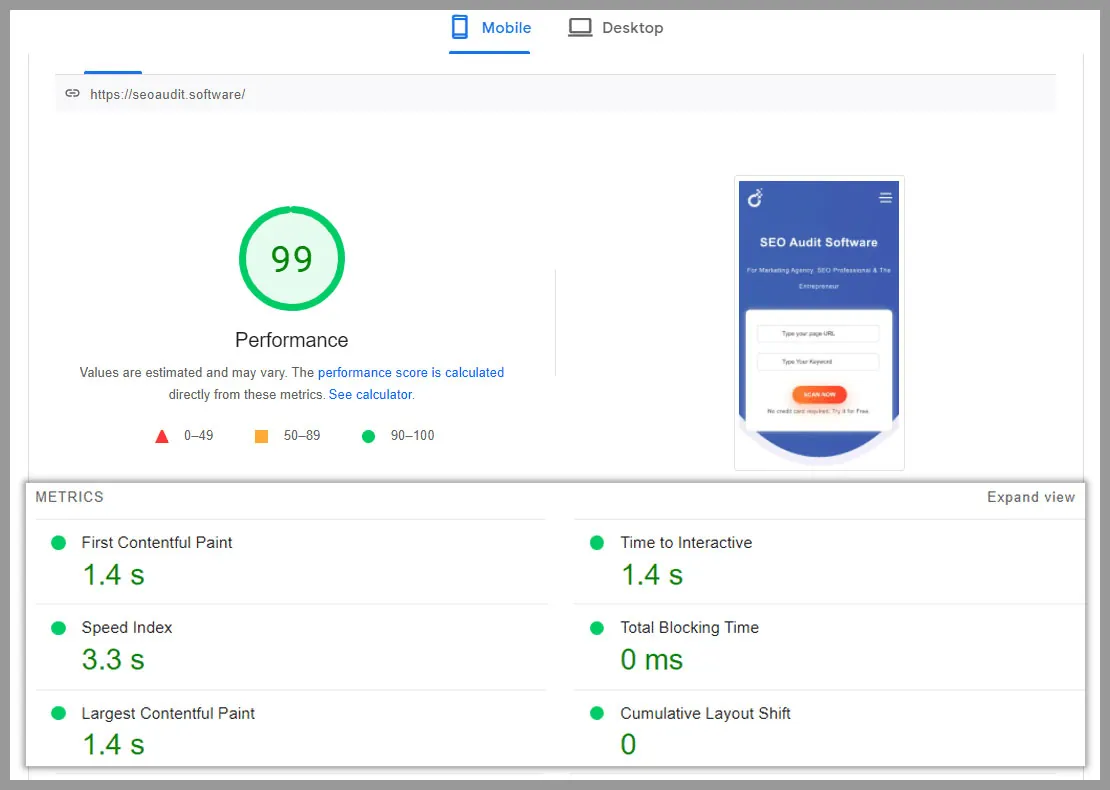
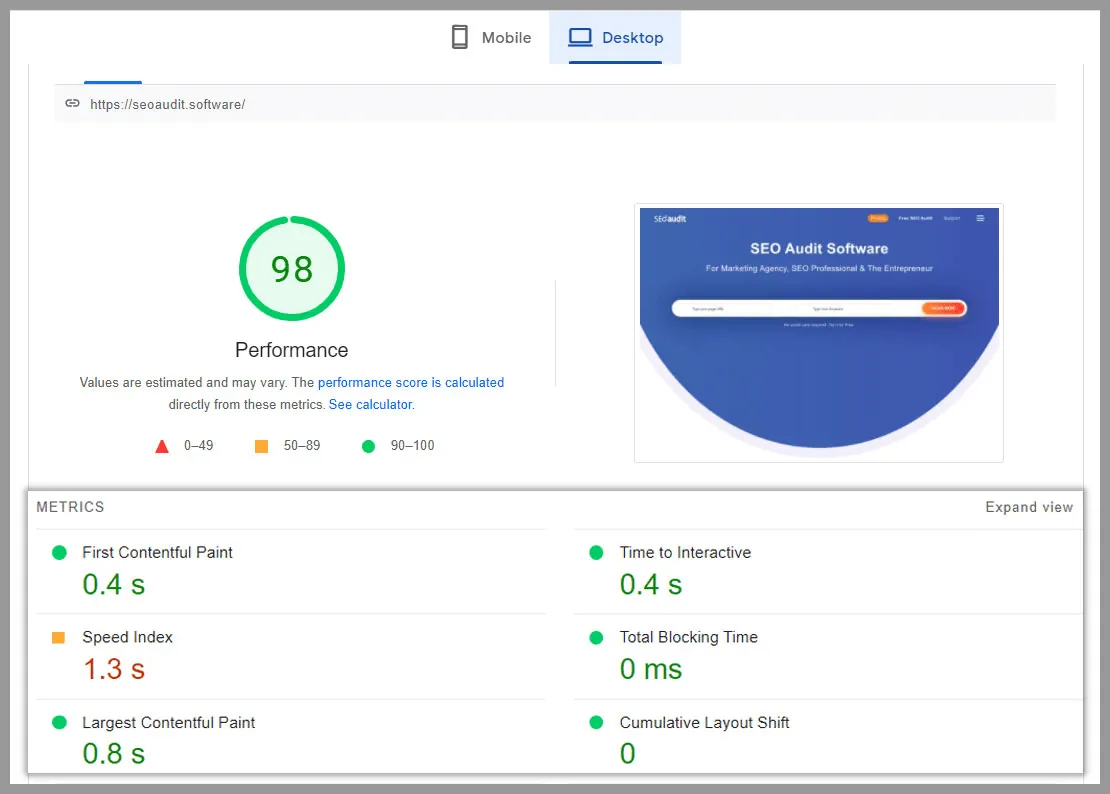
Although the result is excellent. That doesn’t mean there is no room for improvement. These PageSpeed performance metrics diagnose some issues and share some opportunities for further improvement.
You can check your site loading speed at GTmetrix too. You will find a performance metric like the below screenshot.
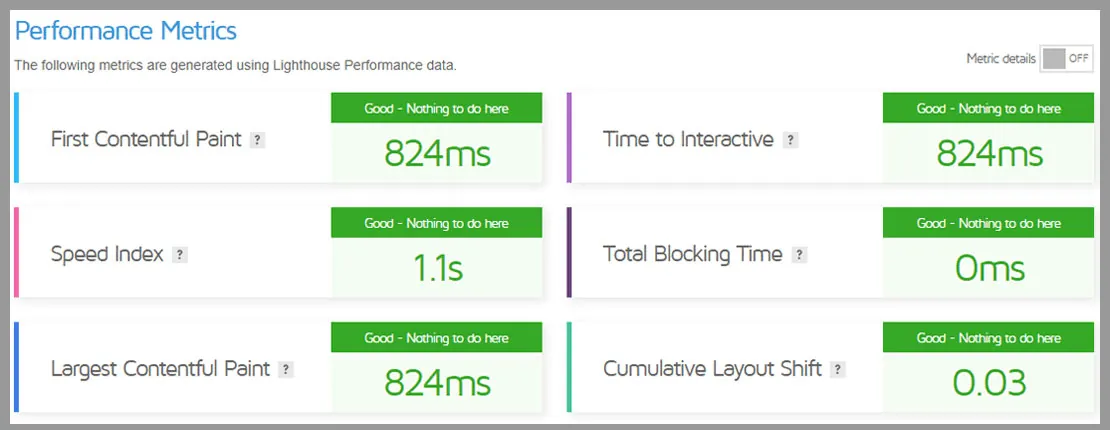
One suggestion, don’t just test your homepage loading speed and assume every page is doing good. Individual pages have individual results.
For instance, we have run another page speed test for one of our important pages.
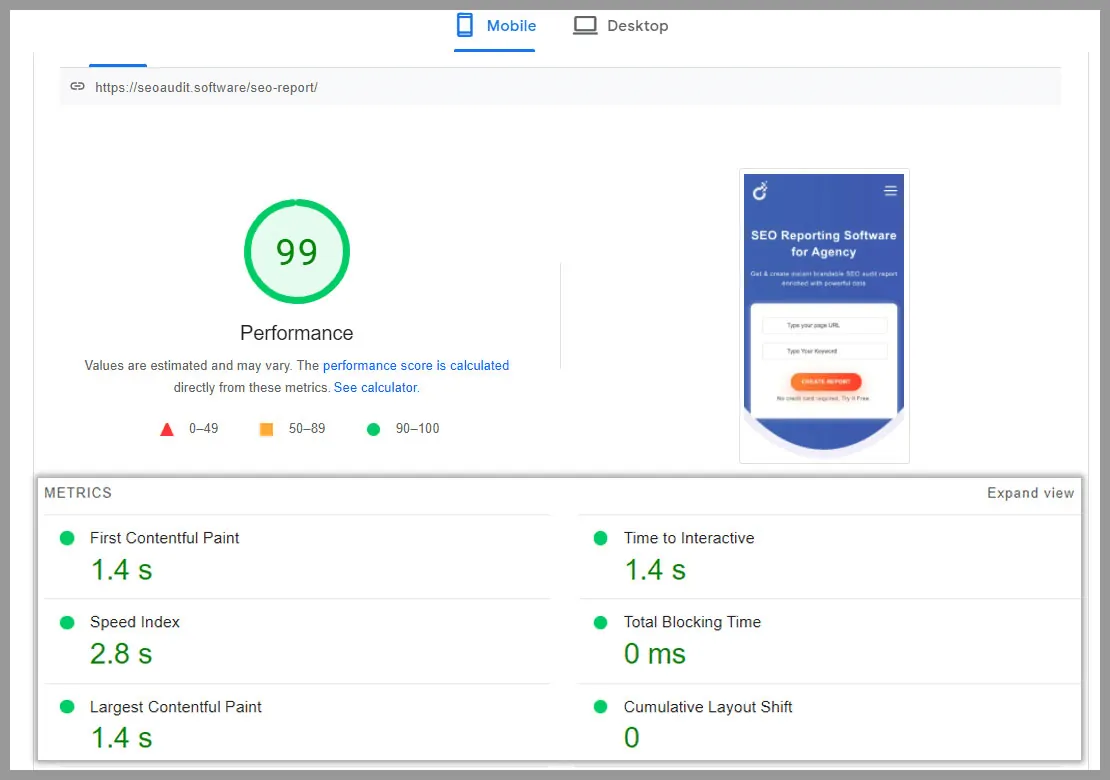
And the result it shows and the problem areas it finds out is slightly different than the home page. Although we acquire pretty good results. But still, this performance Insights shares some opportunities.
So now we have to work on the opportunities this software tells us to do to further improve it.
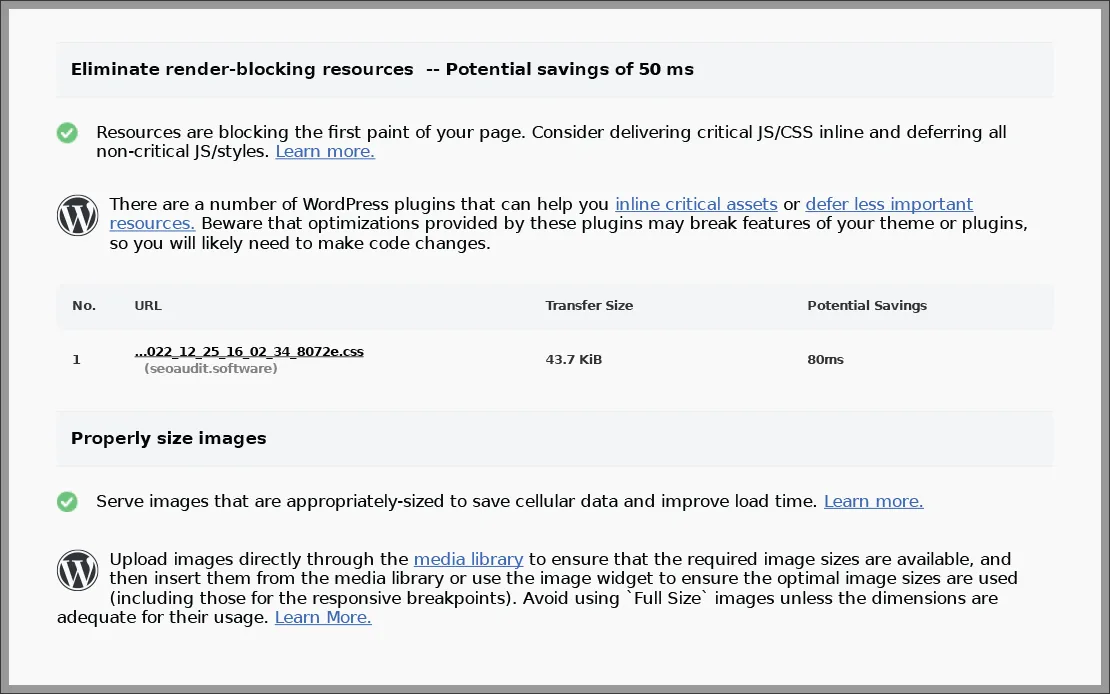
So run the loading speed test for every popular page of yours. And do the needful suggested by SEO Audit Software.
Some SEO best practices for page speed
- Reduce unused CSS and JavaScript. You can significantly boost page speed by optimizing your code. Including removing unnecessary code, characters, spaces, and commas. Here you can use CSSNano and UglifyJS, recommended by Google.
- Use only optimized images (compressed version). Compress your image in photoshop. By doing so you can reduce the image size while maintaining the image quality.
- Reduce URL Redirect Time: When a page redirects to another page, visitors have to wait for the HTTP request-response cycle to complete. That causes more URL redirect time which hampers your page loading performance. To reduce that, regular scanning is needed. It helps to point out the old redirects that might redirect to pages you deleted a long time ago. Also, plugins can cause unnecessary redirection. So make sure to remove any plugins you don’t need.
- Reduce Server Response Time: Improve your server response time. For doing so, stick to a simple WordPress template. If you are using PHP script, make sure it’s not filling up the resources with unnecessary tasks. And make sure you are using the updated PHP version. Configure caching for better UX and loading speed. And lastly, reduce the size of your CSS And JavaScript code.
5. Check the site Mobile-Friendliness
Do you know, 60% of all traffic comes from mobile devices. And the traffic is increasing day by day.
So it’s not unexpected that Google prioritizes mobile users over all other device users.
Google algorithm changes and requests to follow the mobile-first indexing best practices for both mobile and desktop versions.
If we looked at how mobile dominance is already affecting Google’s search results. Only 11% remain the same rankings across mobile and desktop. However, 8% of websites are completely outranked when looking from mobile.
That being said, dropping out on mobile has more adverse effects than on desktop. As well as from user behaviors and engagement perspectives.
Make your site optimized for mobile. So users can easily switch between any device.
We just utilize SEO Audit Software to generate the results of the mobile usability test. It reveals whether or not we take the responsive web design root.
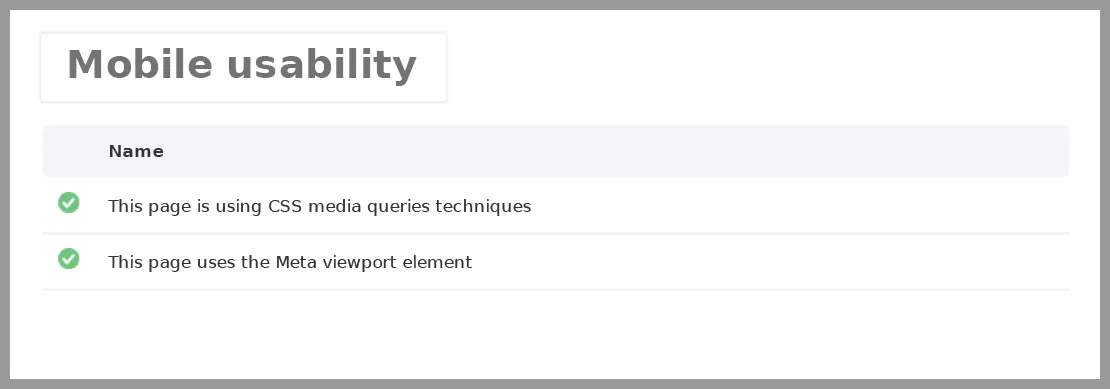
The green indication in the screenshot indicates that our responsive tools are active.
Google retired its Mobile-Friendly Test in December 2023. To check your site’s mobile friendliness today, run Lighthouse in Chrome DevTools or test the mobile version in PageSpeed Insights.
Check out the below screenshot. When we first wrote this step, we put our site URL into the Mobile-Friendly Test, which was still available then. And here’s the result.
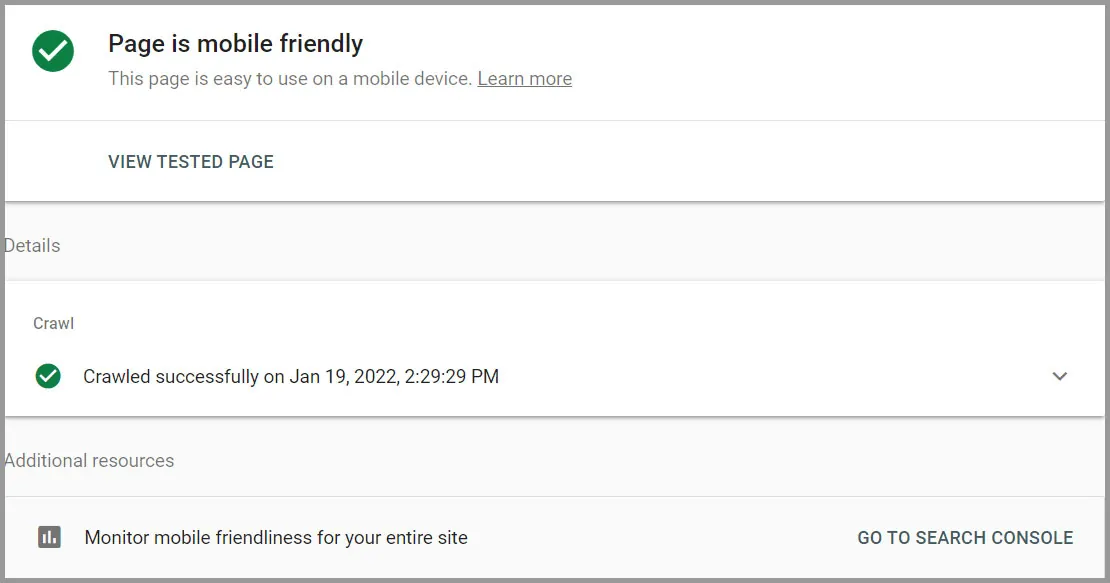
At the time, Google Search Console also had a Mobile Usability report that flagged issues. Just like the below screenshot.
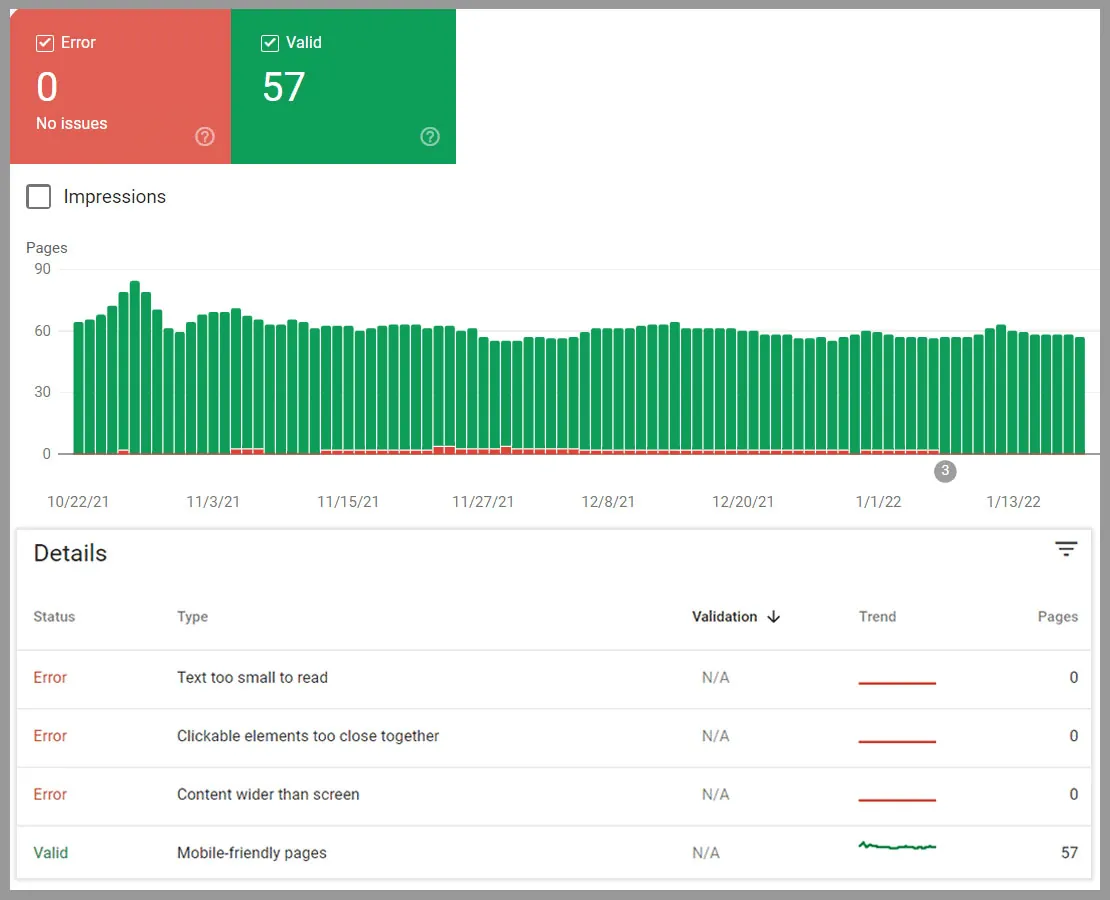
Resolve each of the issues that it suggested one by one. When you’re finished, make sure to test your site on multiple devices. Check for any navigation or loading issues on your mobile, tablet, or other devices.
It will gradually improve your landing pages rankings on SERPs.
Some quick suggestion
- Ensure that Google has access to everything.
- Avoid using popups.
- Display the same content on desktop and mobile.
- Improve Mobile Site Speed.
- Provide a consistent Mobile Experience.
- Carry out Mobile SEO.
- Take a look at Accelerated Mobile Pages (AMP) and Progressive Web Apps (PWAs).
6. Find and Fix the Orphan Pages
Delete the child pages that no longer have a relation with your parent page. To understand the relationship between parent page and child you need to understand the site structure. Which we talk about in the later steps.
Orphan Pages are web pages that do not have a link to them. These pages are no longer receiving any links from your website. Furthermore, orphan pages are not useful anymore.
For search engines, the crawling strategy depends on hyperlinks. Those orphan pages no longer fall in this category. Due to these pages, it may happen that the search engine failed to capture all your pages. As orphan pages lack internal and external linking. As well as no authority is passing to those pages.
So it’s important to detect everything and fix it.
To detect all one simple method is to type “site:yourwebsiteurl” in the Google search bar.
This will show how many pages your website currently contains. If the number is higher than anticipated. Then you have orphan pages that you have to delete or fix.
You can use Google Analytics → Behavior → Site Content → All Pages.
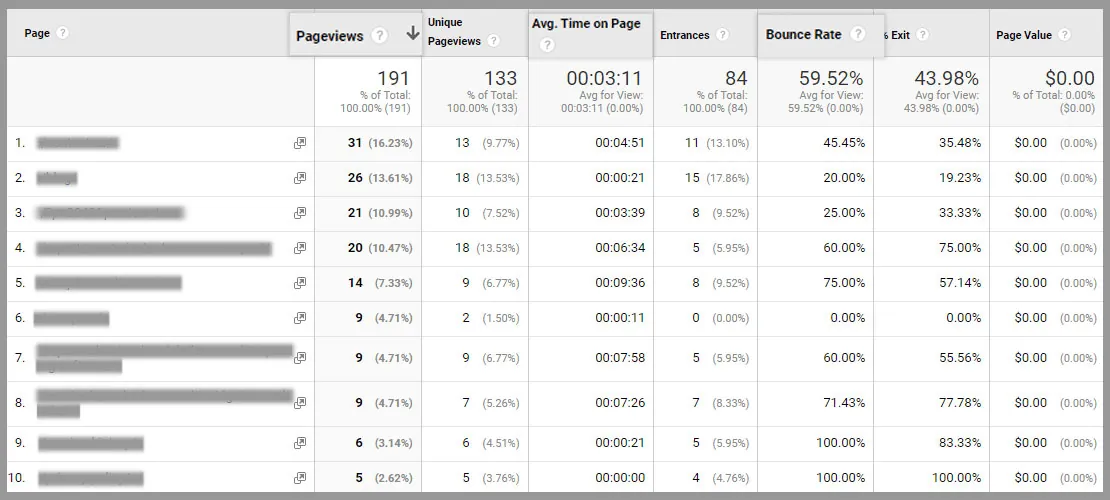
Here you’ll get a detailed overview of all your indexed pages. Based on the list you can easily find out all your orphan pages.
To get rid of your orphan pages you can use 404 or 410 HTTP codes. These codes pass signals to search engines that these pages no longer exist.
7. Improve your Site Structure
A structured site is important for SEO. It makes your web content easy to find. Your structure should reflect on your menu bar. So users can easily navigate them.
You can define your site structure by maintaining a hierarchy.
First, define a parent page. Parent Page is a big fish. There are children of this big fish. Suppose we name them as medium fish. Those medium fishes can have siblings. Which we named as small fish.
That’s how a site hierarchy is defined.
Typically a parent or big fish is your home page. Which contain all the child pages. You can do internal linking between all the child pages. And those child pages belong to that parent pages. From the parent pages, you can link to the child pages. But you can’t link back from the child pages to the parent page.
All these hierarchies of content and context help search engines to better understand your site. And it is beneficial for SEO.
SEO Audit helps to find out the structured data errors. Simplify your site navigation. So it wouldn’t take more than 3 clicks to move from the homepage to other pages. The goal here is to make your site easy for Google and the users.
Detect Structured Data Errors
Implementing a simple site structure helps you to find out any data structured errors. Here structured data tools can help. It lets you know that search engines understand your marked-up content.
You can also see if there are any mistakes. Also, be mindful that your page is up for valid markup.
Use the Schema Markup Validator, which replaced Google’s Structured Data Testing Tool, or the URL Inspection tool in Google Search Console, where you can inspect any page URL.
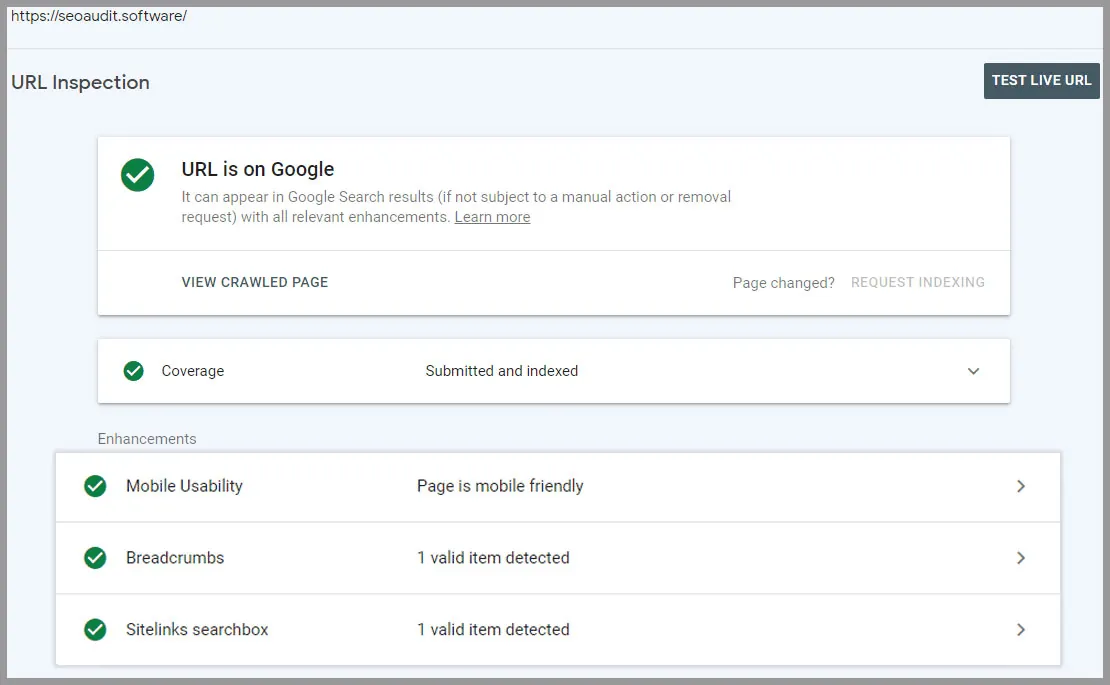
And to diagnose structured data errors use Rich results testing tools.
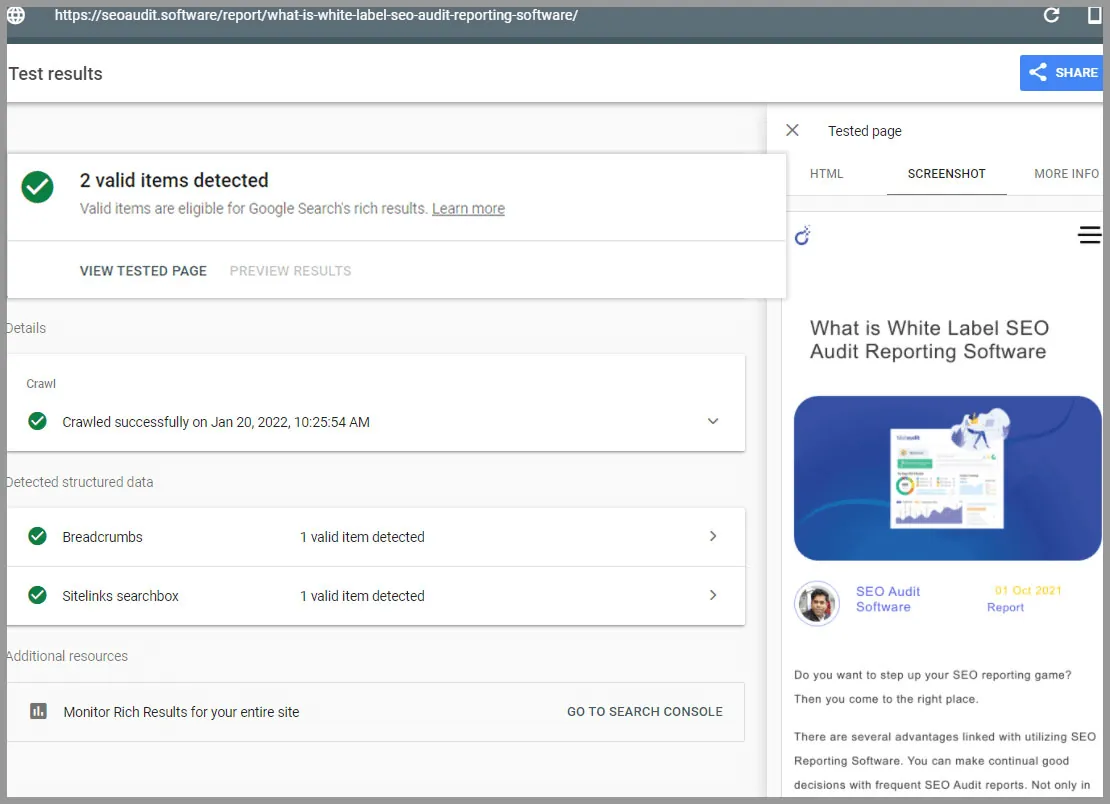
The result shown in the above screenshot is great. If there are any errors Google will surely indicate that.
Now it’s your work or your developer to make necessary changes to the code. So that the data errors do not impact your site experience.
8. Check out Your SERPs Competitors
Finding out what your competitors are doing can open a huge ranking opportunity.
There are one billion searches happening on Google. It can be tough to find out what keywords to target.
That’s when you need to check your SERPs competitors. For eg., if you search using the term ‘SEO Audit’ you will find the top 10 who are ranking using the same keywords. So why not you?
Borrow the keyword or content idea from them, craft your own. By doing so you can even find out what you’re lacking.
Competitor analysis can be done in the following ways
- Find out what keywords your competitors are ranking.
- Examine the pages that rank for such keywords.
- Look at the internal and external linking of those pages.
9. Target the Right Keywords
Before starting the technical audit, you need to think about the keyword you are targeting.
Determining the keywords that bring your majority of traffic will help you to define the focus area.
You will now know the targeted pages and where the on-page SEO Audit is much needed. You will also understand the types of keywords your audience mostly searched for. So now you can use those keywords to bring the much-needed traffic.
Your work here will be to conduct an in-depth analysis of those keywords. You can do that from Google Search Console.
To begin, go to the landing page and select “Start now.” After that, sign in to the Google account that you want to link to your site’s Search Console account. If you’re using Search Console for the first time, you’ll be asked whether you want to add a domain property or a URL prefix property.
After you have verified, start analyzing your search performance. Here you will receive an in-depth click, position, impression, & CTR data that highlights the niche user searches.
Google Search Console ties up with Google Analytics data.
Using both you can see the organic search activity more clearly. Above all, you will know where you are gaining more traffic. Organic search, direct, social, or other referral channels.
At Google Analytics, go to Engagement → Pages & Screens. You will get a total overview of which pages are doing good in terms of new users rates, views, engagement time. And vice versa.
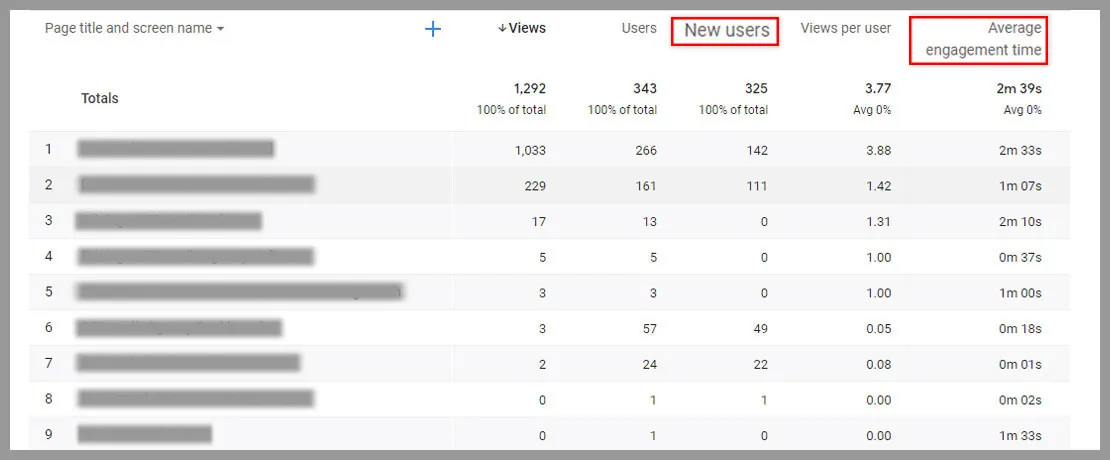
These search performance metrics help you to grab data of where you need to give more focus. It will also give you a clear picture of how well your search queries are performing in terms of user engagement and conversion.
You will also get a queries breakdown at Search Console → Queries. Crosscheck the data at the Google Search Console as well.
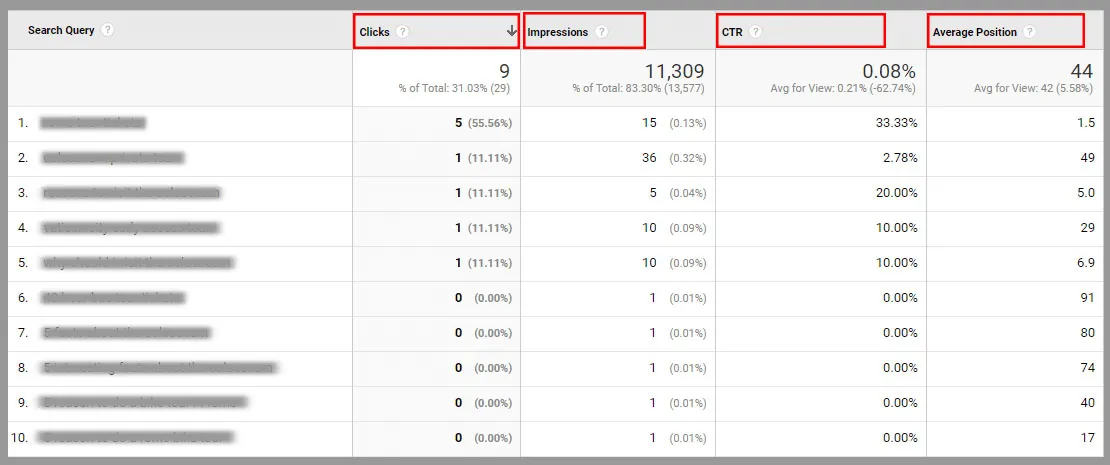
There are much simpler options available as well. Such as Keyword Rank Tracking Tool. All you have to do is open Keyword tracking at app.seoaudit.software and click Add project. You will get a complete keyword ranking report for the project. Our agency rank tracking page explains how it works.
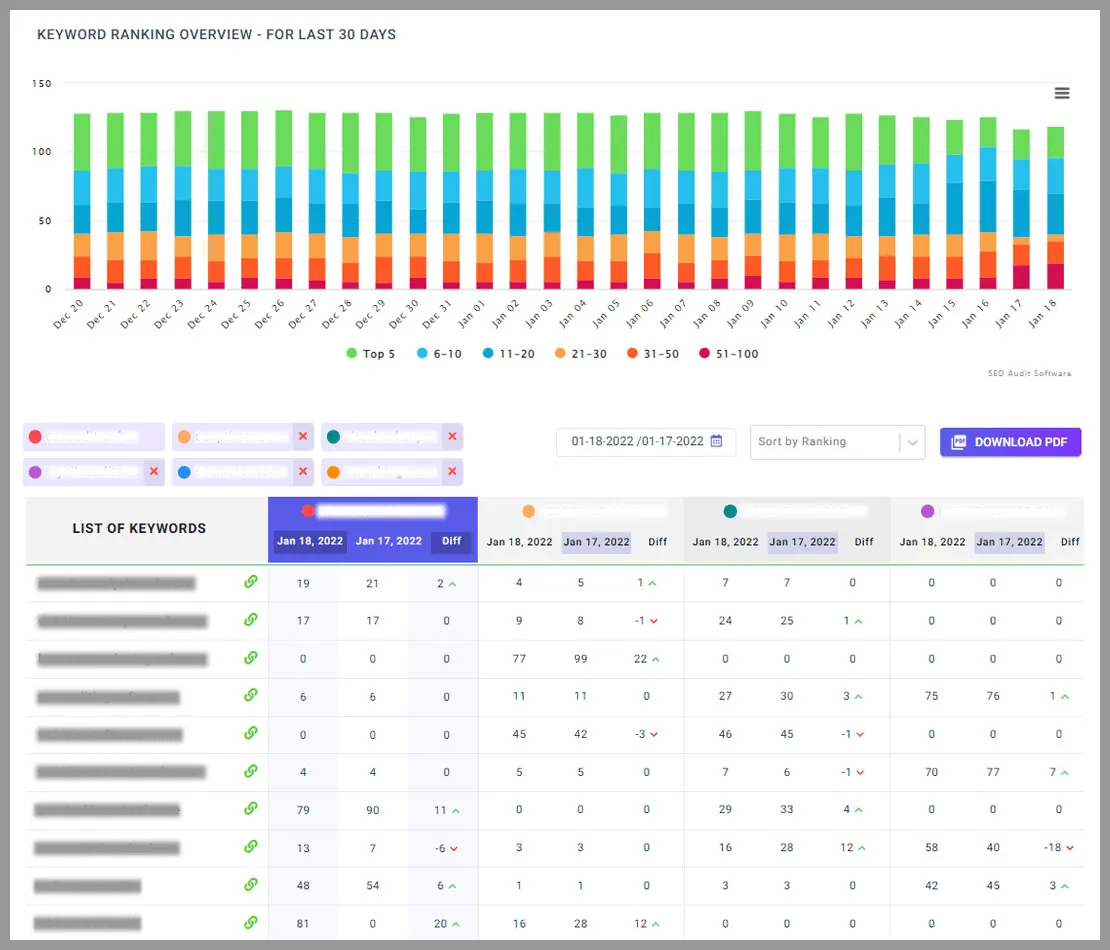
Such detailed overview you won’t find at the Google search console. Here besides your keywords ranking data you can also analyze your competitors’ data. Get the comparison side by side for better understanding.
Now you know what keywords are working and what needs improvement. Let’s move to the deeper SEO Analysis.
10. Analyze Website Traffic Growth
For a deeper analysis of your website, you need to understand your traffic acquiring pages. It’s important as we go in-depth with the SEO Audit process.
Here Google Analytics helps you with estimating traffic numbers.
You will get an idea of your real-time traffic sources, how many active users you currently have. And the page views per minute.
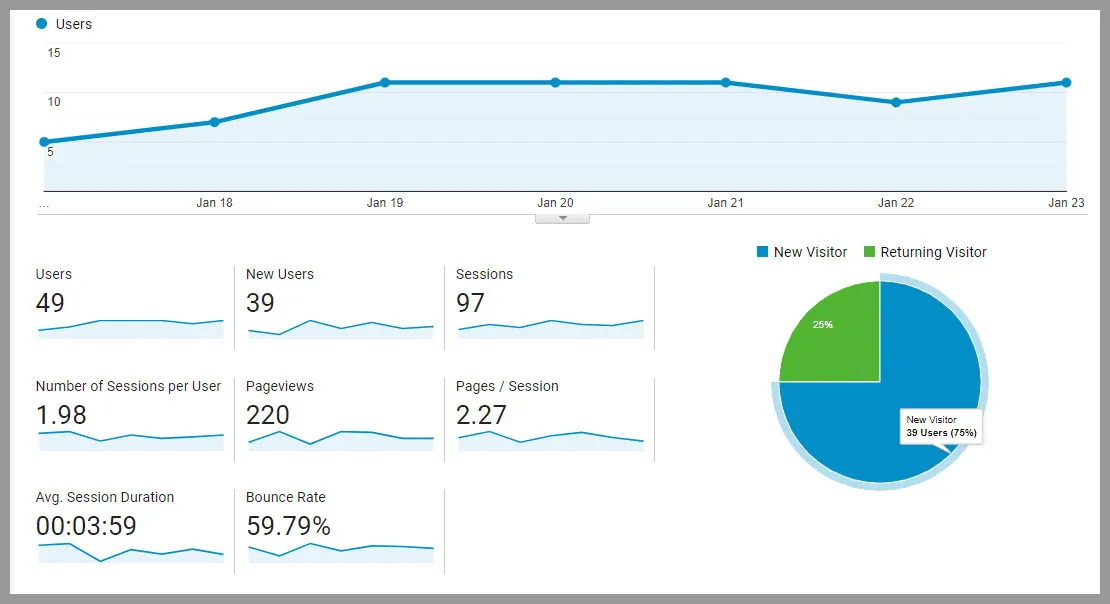
In fact, we obtain analytics reports for one of our clients. You’ll notice that the new user acquisition rate is 75%, with the remaining 25% made up of returning customers. It’s not possible that you can grab the attention of 100% of the visitors. New user rate and the pageviews are great. Given that they need to work on lowering the bounce rate.
Depending on the website, a bounce rate of between 26 and 40% is excellent. And the range around 41 to 55% is average. The range of 56 to 70% is higher than the standard average.
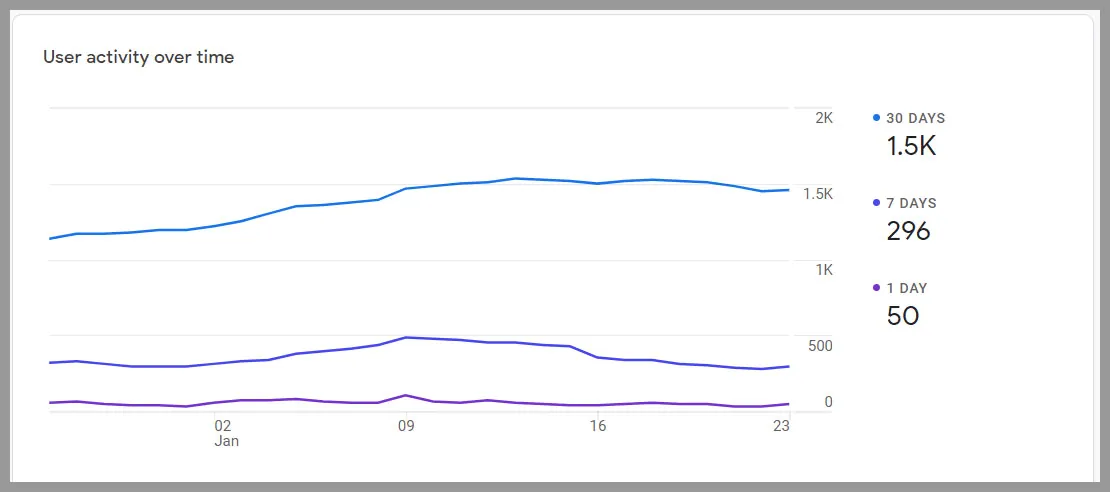
Here’s a graph showing our active user activity. You can see that we have a 1.5k active user rate in just 30 days.
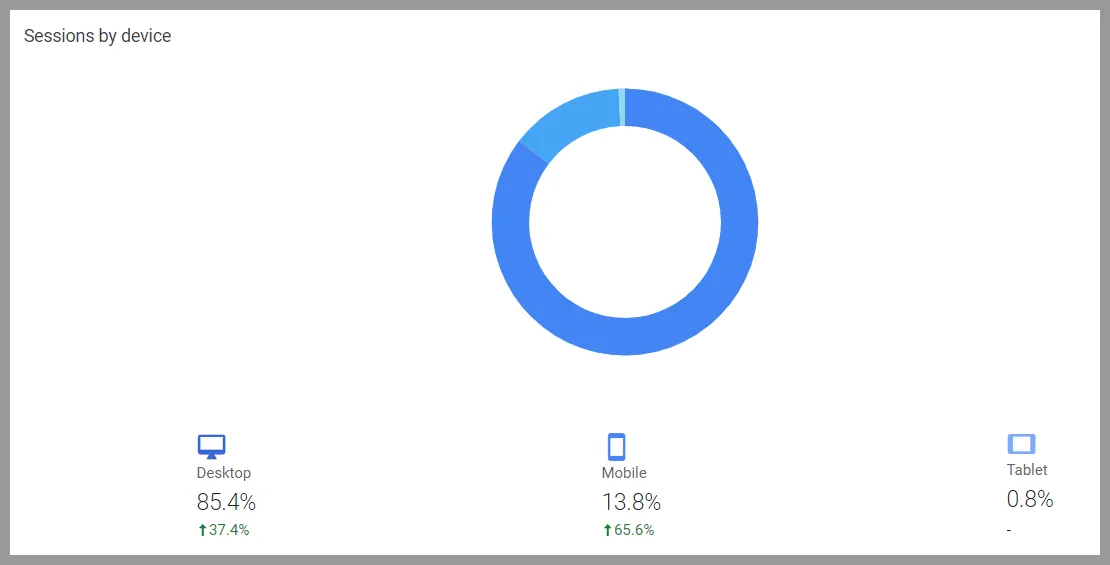
Not only that. At Acquisition → Traffic Acquisition, you will get the traffic sources based on the user session. Irrespective of the devices, you can acquire all data from where you are getting the most traffic and from which channel.
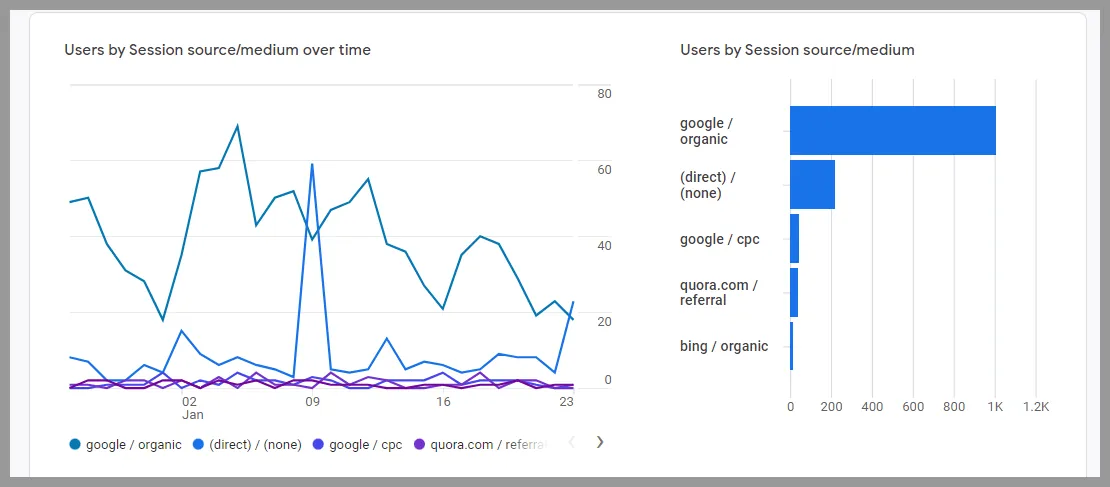
You can also get an overview of your goal completion pages.
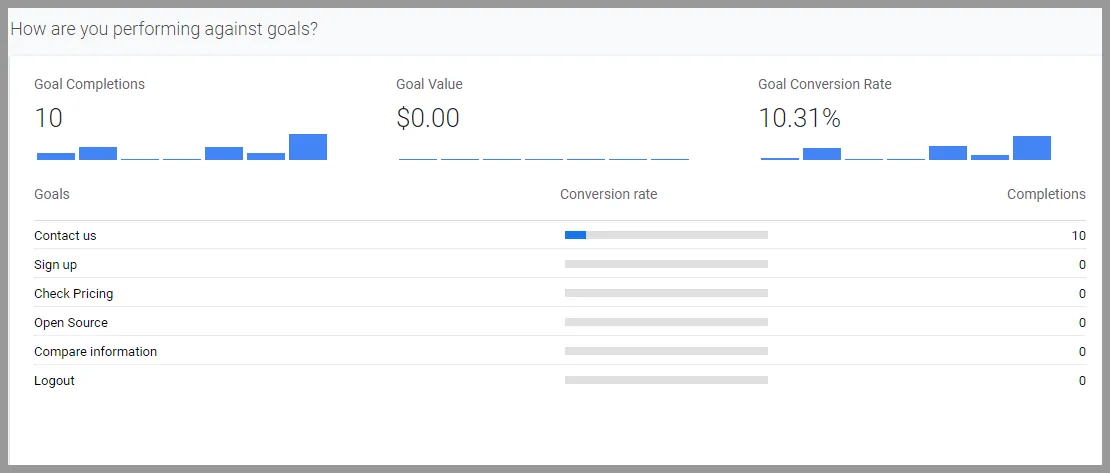
Not just relying on the keyword performance data. With the traffic growth ratio, you can define your top-performing pages where you need to put your most SEO effort.
11. Crawl your Website and Improve On-Page SEO Issues
To do the necessary On-Page SEO Audit you can use a tool like ‘Technical SEO Audit tool’
Just simply paste your URL and the defined target keywords.
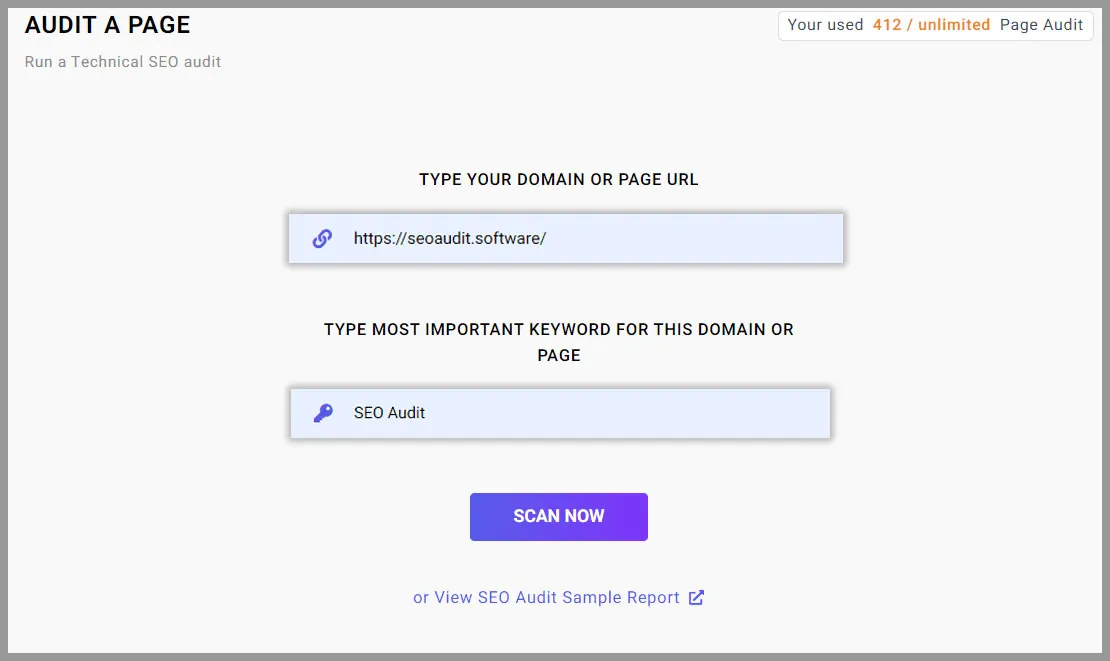
In just a few seconds it will show a comprehensive Advanced SEO Audit Report. It will check 150+ important SEO factors.
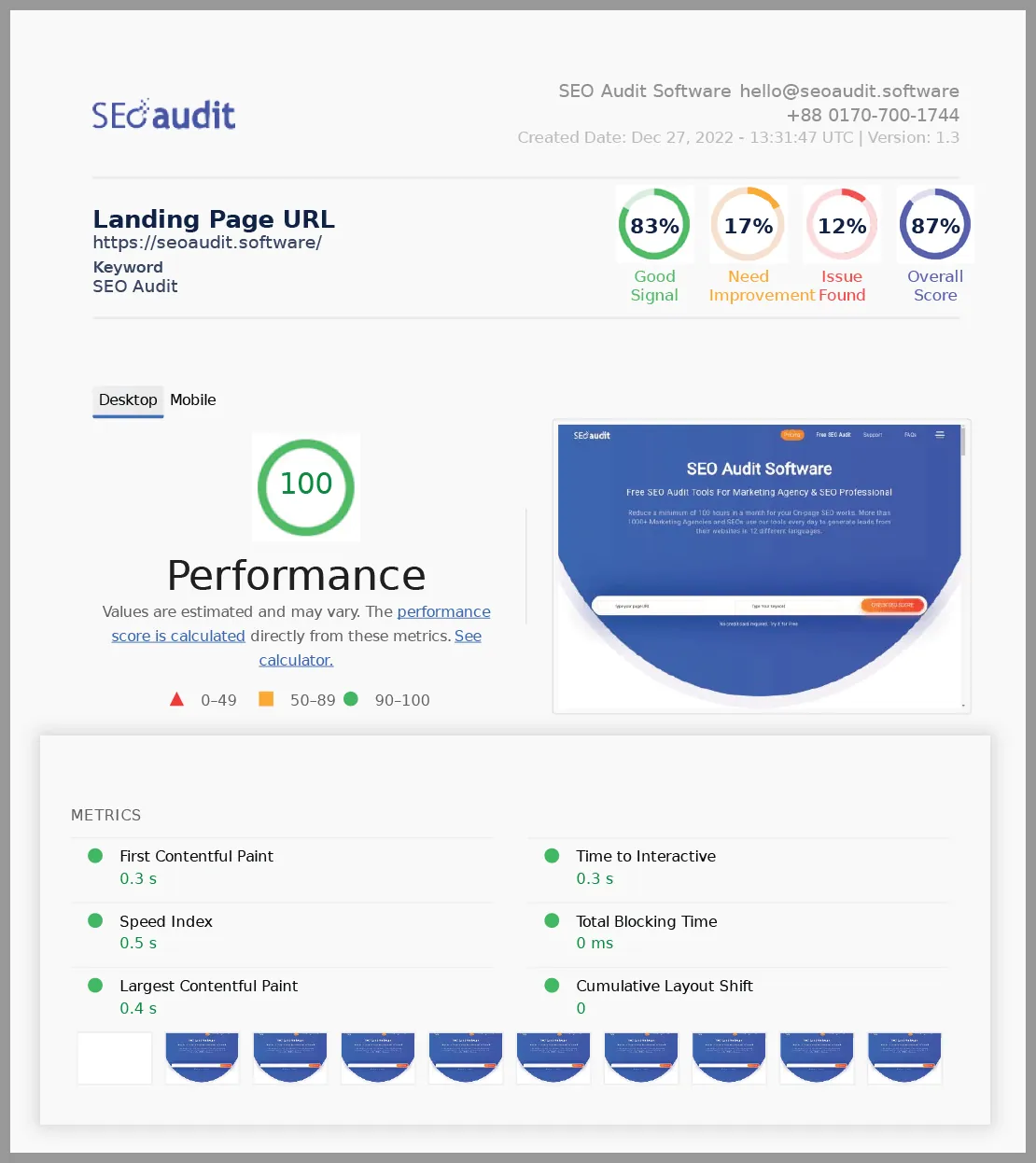
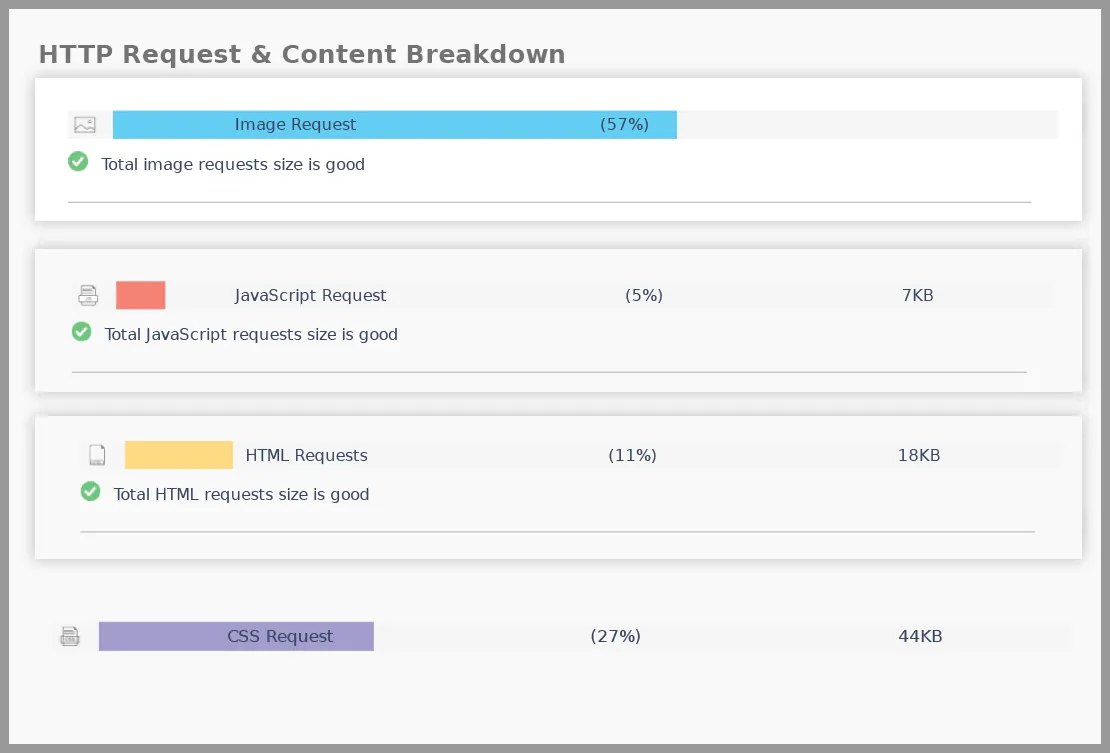
See just like the above two screenshots, there are a ton of things to fix. Don’t get overwhelmed.
Simply go one by one to fix everything.
Already we explained about the Page Speed and Load Performance.
Now go deeper into the On-Page SEO Statistics.
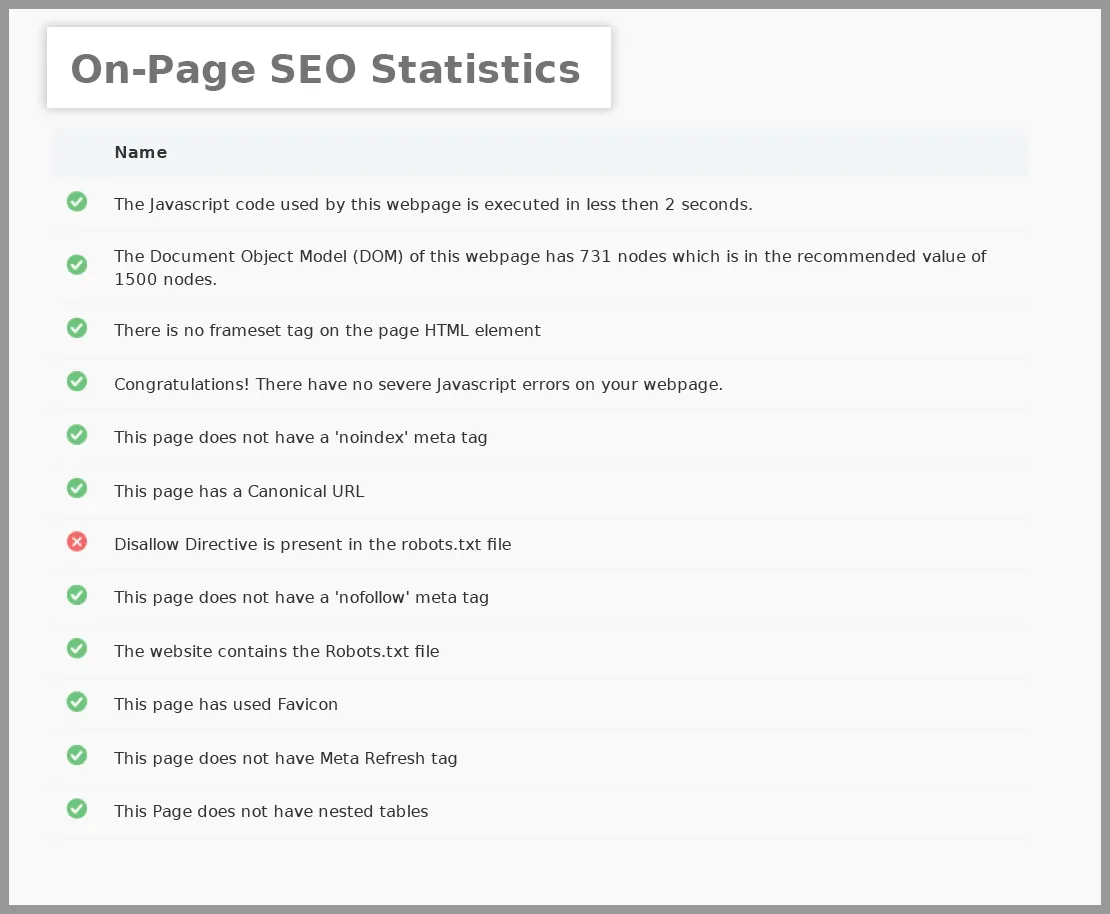
Some common and not ignorant On-Page SEO Statistics are,
Total words
Your page content is the heart of SEO. High-quality content always wins, while implementing the relevant keywords and topics.
Total words on the page are determined by a number of parameters. That includes site structure, font type, font size, spacing components, margin spacing, and paragraph length.
Depending on these factors you actually can’t define the number of words per page.
A standard page should contain more than 2000 words. Web pages that have less than 300 words are determined as “thin content” by Google. It will most likely rank lower in search results.
Some suggestions for your content,
- Create content considering your specific buyer persona (s).
- Create content that solves your audience’s problem
- Create content that others will want to share and link to.
- Your CTAs and product pages should be optimized for conversions
Total Characters
Just as total words on the page, the total characters limit is also debated. A page’s character count should be more than 10,000 on average. Our suggestion is to take one page at a time. Give more concentration on the quality of the content
Nofollow meta tag
The ‘nofollow’ meta tag is used in a webpage’s HTML source code to tell search engines (most notably Google) not to pass link equity across any links on that page. By including ‘rel=nofollow,’ you allow spiders to reject the link and indicate that the page’s link has no connection to your own website.
Nofollow is recommended for any paid links. Having no Nofollow meta tags is considered a good signal.
Noindex meta tag
Having a noindex tag means it prevents search engine crawlers from indexing it. You want certain pages in private, you can use the Noindex meta tag. However, Google warns that your page may still appear in search engine results from other search engines. It’s a good practice to not have a Noindex meta tag.
Disallow directive
In the robots.txt file, the disallow directive is used to tell search engines not to crawl a particular page. In most cases, this will also stop a page from showing up in search results.
Having no Disallow directive in the robots.txt file is a good signal.
Meta Refresh Tag
Meta Refresh Tag usually used to refresh a page where the visitor has. It is placed on the webpage’s HTML code.
It also used to redirect users from one page to another. A meta refresh redirect is not the best method of redirecting from an SEO perspective. Because, as the name implies, it is more like a page refresh than a redirect. We suggest using 301 redirect instead of Meta Refresh Tag.
Nested Table
Nested tables are used to customize page layout by constructing larger and smaller tables with varying cell sizes. When creating a website, employing nested tables may appear to be the easier option. However, they are not recommended for SEO. They take longer to load, slowing down the entire page load.
They lack adaptability. Mobile devices will struggle to display complicated table structures due to their constrained viewing area.
Canonical Tag
If you have two identical pages, at that time you can use a canonical tag that contains the original URL. It tells search engines which version of the URL should appear.
Canonicalization is a different concept. Canonical Tag is used if you have a single page that can be accessed by multiple URLs. Or have the same content on two different pages.
Here Google takes such pages as duplicate versions. It chose one as the canonical version ignored others. And if you don’t tell Google which one to choose, chances are you lose the page which carries more value.
So it’s ideal to indicate your preference to Google by using rel=canonical labeling.Some best practices.
- You may use a canonical tag with your home page URL. As users may link your home page in many ways. It is just a safer way to prevent any harmful event from occurring.
- Don’t mix signals. Don’t create a canonical chain. For eg, from Page A to Page B and again Page B to Page A. Send clear signals to search engines.
People often confuse the Canonical tag with 301 redirects. If you use 301 redirects, people only see the redirected page. But if you use canonical tags people can still access both pages.
That being said, a canonical tag doesn’t mean hiding your duplicate content. It simply means to set your priority straight. Such tags are mainly used for product pages that have near similarities.
Inline-style
Inline-style is used for a specific HTML element by combining style attributes and CSS properties. Although they have a purpose but consider bad SEO practices; if,
- Inline style can’t be separated from content.
- Maintaining a website will become a headache if there is a mixture of different Inline styles.
- As it is added within the code, it affects how search engines crawl your site.
- Inline style unnecessarily makes your page appear longer. That affects the loading time of your page.
Some SEO best practices,
- Separate design element from HTML code.
- Having CSS code in one place makes the website maintenance work easy. The codes appear also clean.
- The best alternate method of Inline style is an external stylesheet. It’s the CSS best practice and easy to maintain. Here all styles will be in a separate document where it is linked to a web document with just a single line of code. If you want to change the style of your whole website, now you just go to one spot. Rather than searching codes on every single page of your website.
Analyze Page URL
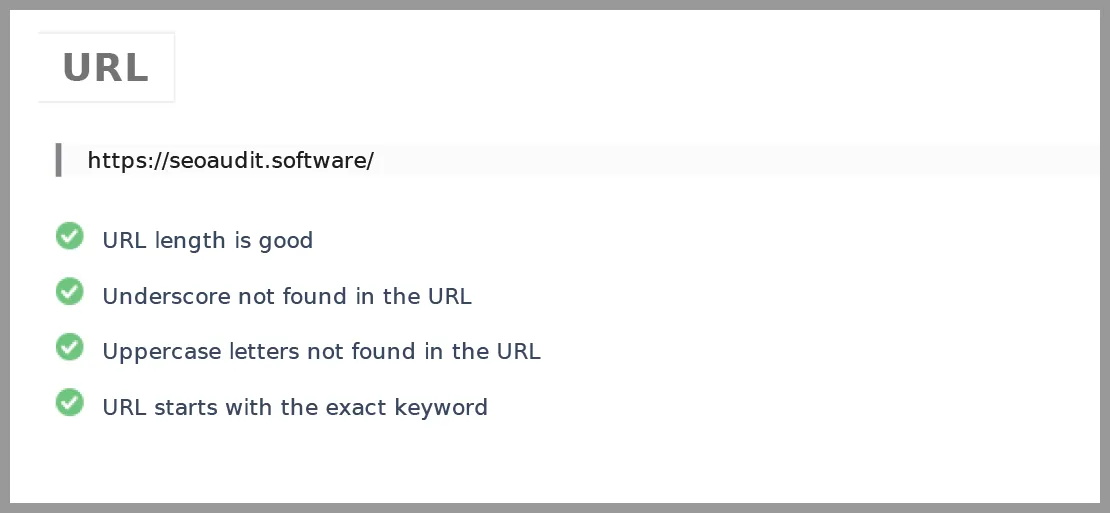
Optimize your URLs with target keywords. But we only suggest optimizing it if the current one doesn’t make sense with the page content. Sometimes good content is greatly hampered by the bad URL.
In this case, make sure your URLs are following all the SEO practices. And that is short, concise, optimized with the keywords.
As a part of the On-page SEO Audit, URL analysis is also done. You will get all the necessary suggestions from the website audit tool.
While talking about URLs you should keep in mind the 301 redirects one as well. And that takes us to the next step.
Analyze all the 301 Redirects
Make sure all your 301 redirect URLs are correct and in place. If there is any redirect chain going on, replace it with a single 301 redirect.
For eg, instead of doing Page 1 > Page 2 > Page 3 > Page 4. Use just a single way which is Page 1 > Page 4.
Fix all the broken redirects that neither Google bot nor people can access. Check all the broken redirect errors. Ensure all redirects are pointed to the functioning URLs.
Analyze Page Title
Make sure your title tag is relevant to the page content. It should be keyword-focused and readable. Within the 55 characters.
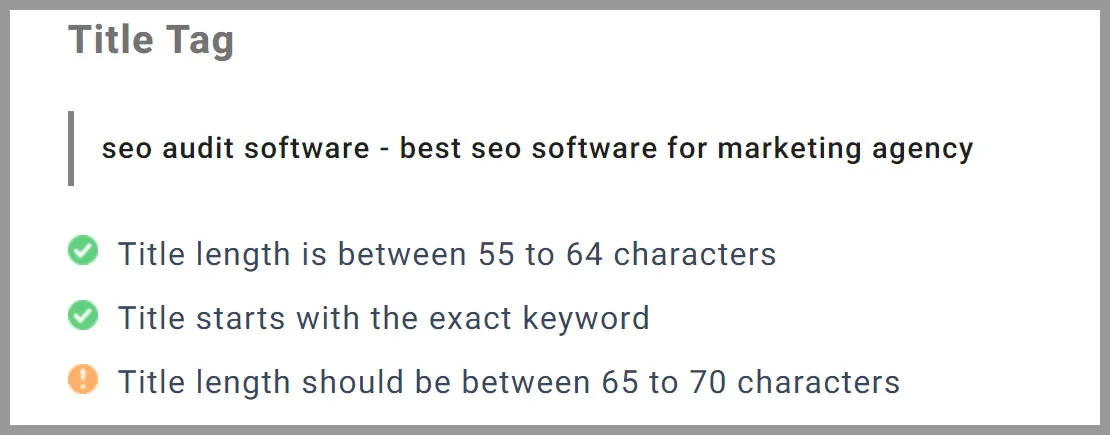
Longer titles that do not fit in the space available to Google on desktop and mobile devices are often chopped off. If your title is no longer relevant, Google will automatically replace it with a more relevant one.
Analyze Meta Description
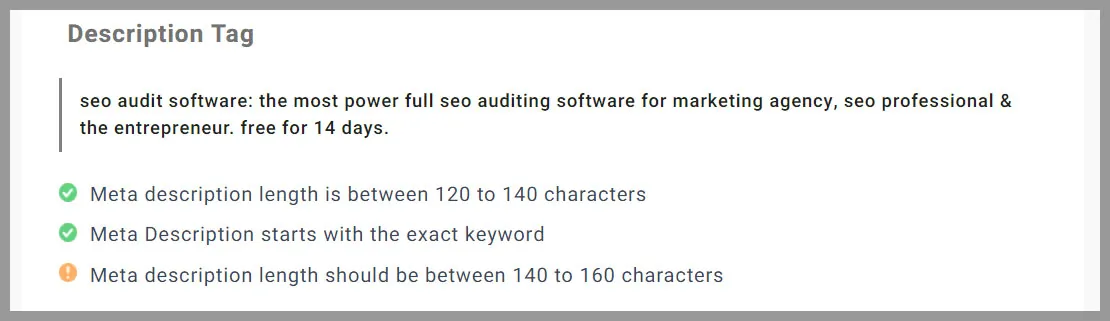
As per the suggestion above you understand what you need to do with your Meta if it doesn’t meet the SEO guidelines.
Make sure your meta description is written in a compelling, engaging way. Tell the user what your page is about.
Analyze your Images
As we already stated in the beginning, always use a compressed version. Along with there are other SEO best practices guidelines for images.
- Make sure you are downsizing your Image files.
- Make sure your Images have Alt Tag. It helps search engines know what your image is all about.
- Make sure your image file has a readable name relevant to the page content. Otherwise, Google won’t be able to read it. Your images will have lower chances of appearing in the search results.
- Keep your image name concise. Too-long names unnecessarily interrupt the content reading flow.
- Don’t use underscore in the image name. Always use hyphens as separators.
- Make sure your Alt Tags and Image Name are optimized with the keywords
You will get the complete list of your page images in the report generated by the SEO Audit tool.
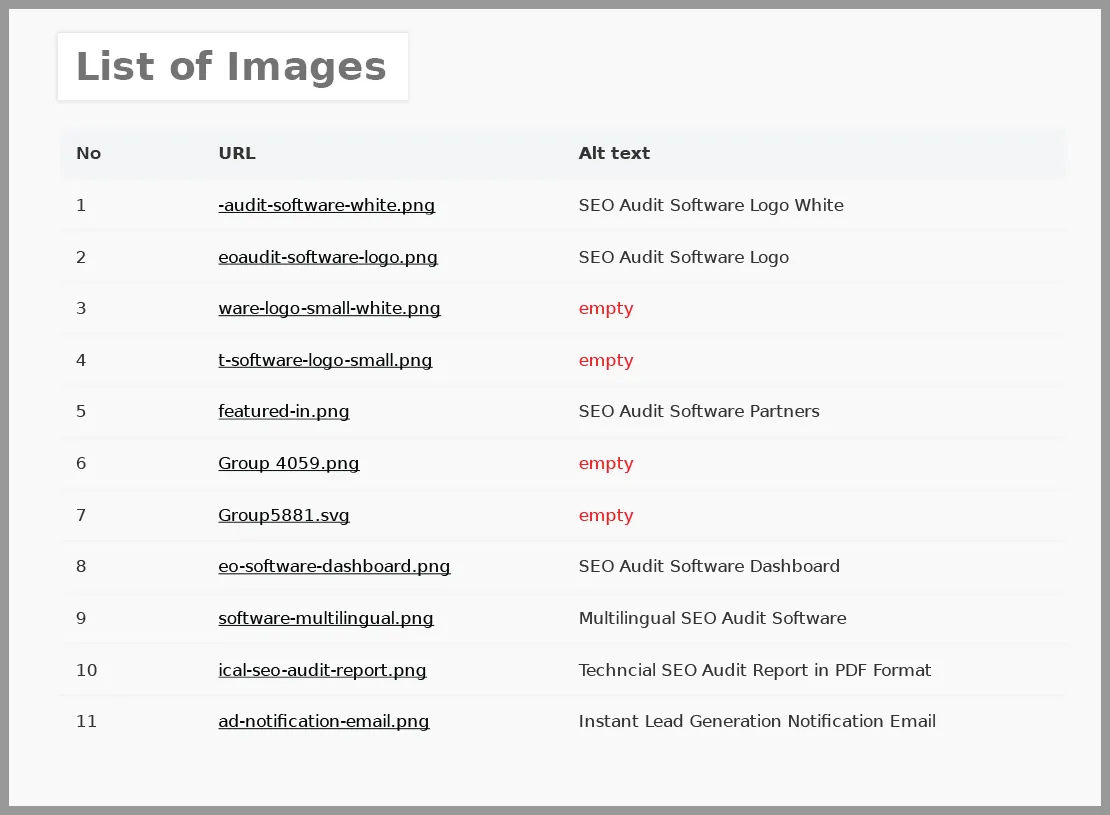
It shows the total number of images that we have on-page with their Alt text. Alongside total image analysis report.
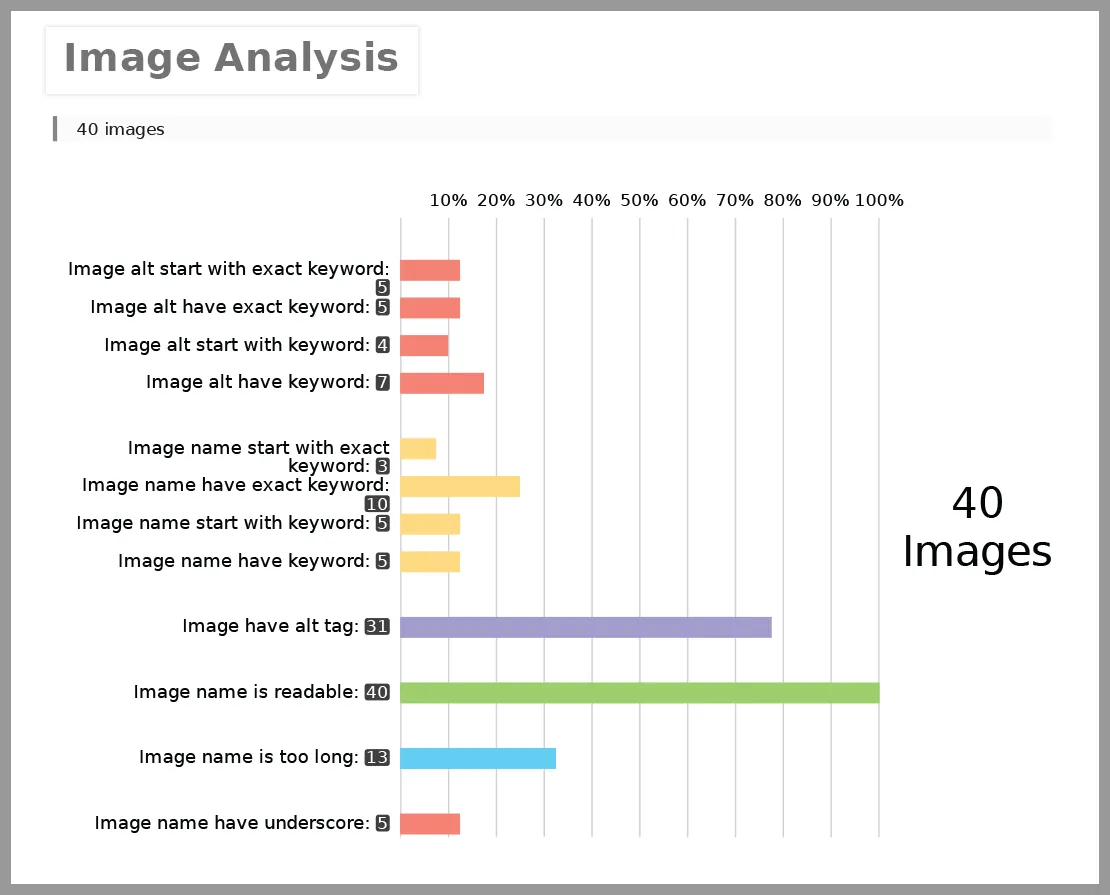
With this analysis report, you will easily find out which image needs further improvements.
Header Tags
Deep analysis of your header tags is important, as Google now shares priorities in it.
By the SEO Audit Software – SEO Audit Tool, you will have that deep analysis report. It shows keyword relevancy with your header tags.
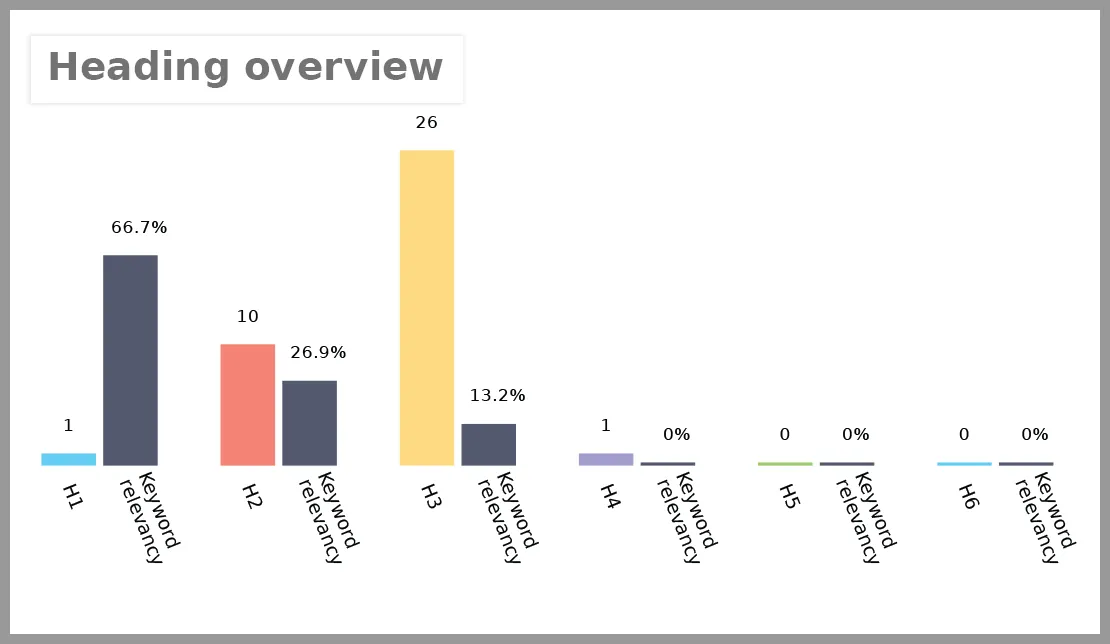
So with the help of this overview report, you can easily understand which header tags need improvements and which are good to go.
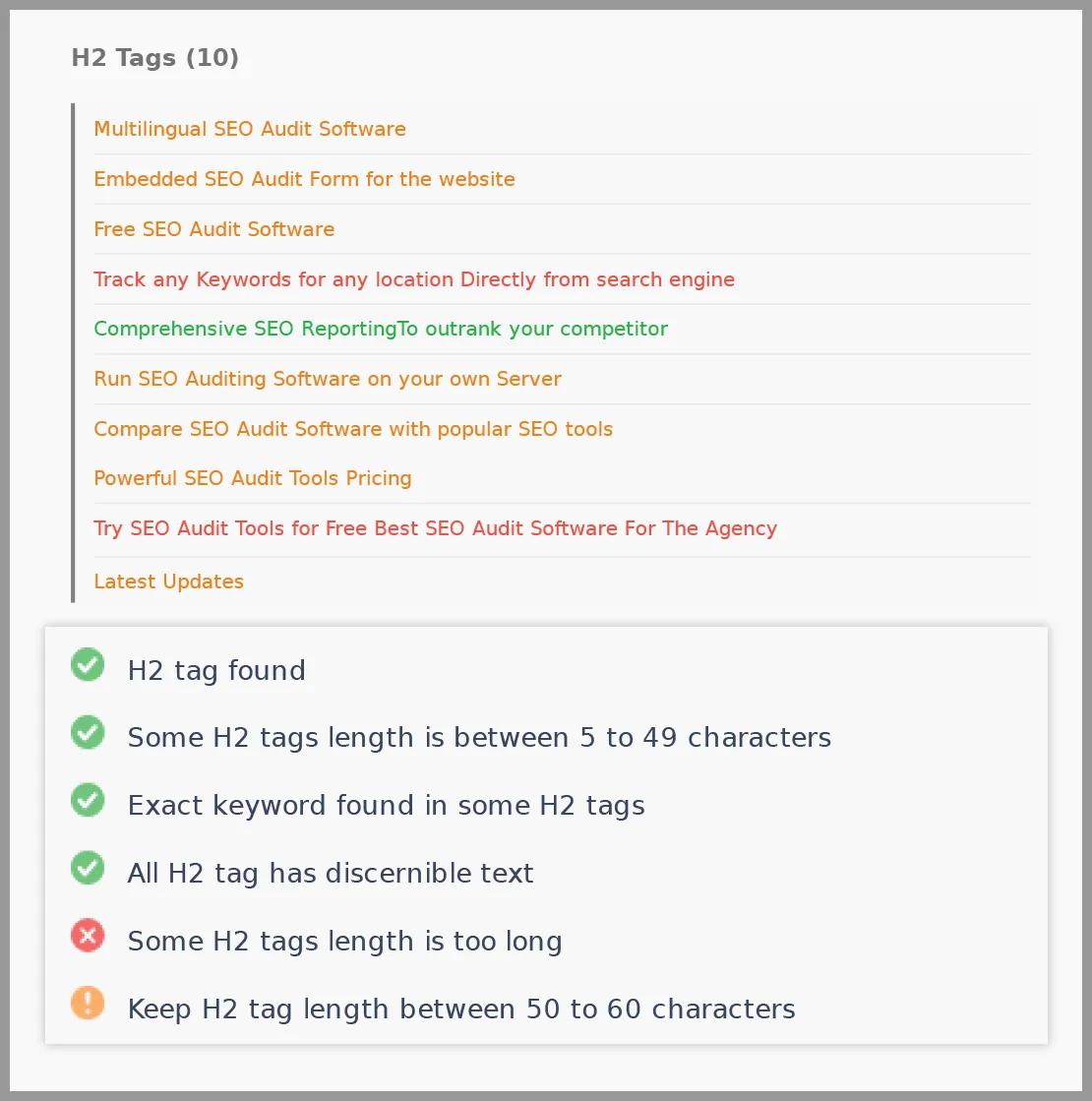
Not only will you get the complete text of header tags that have been used on your page. You will get the necessary recommendation for improvements.
The hierarchy of header tags should be maintained across the page, which implies that H2 tags should come after H1 tags, rather than H3 or H4 tags.
Analyze the Existing Internal links
Do the internal linking the right way. Make sure your existing page contains relevant and high-priority pages.
Here with SEO Audit Software, you will know how many internal links you’ll have and their health conditions. Check out the below screenshot for better understanding.
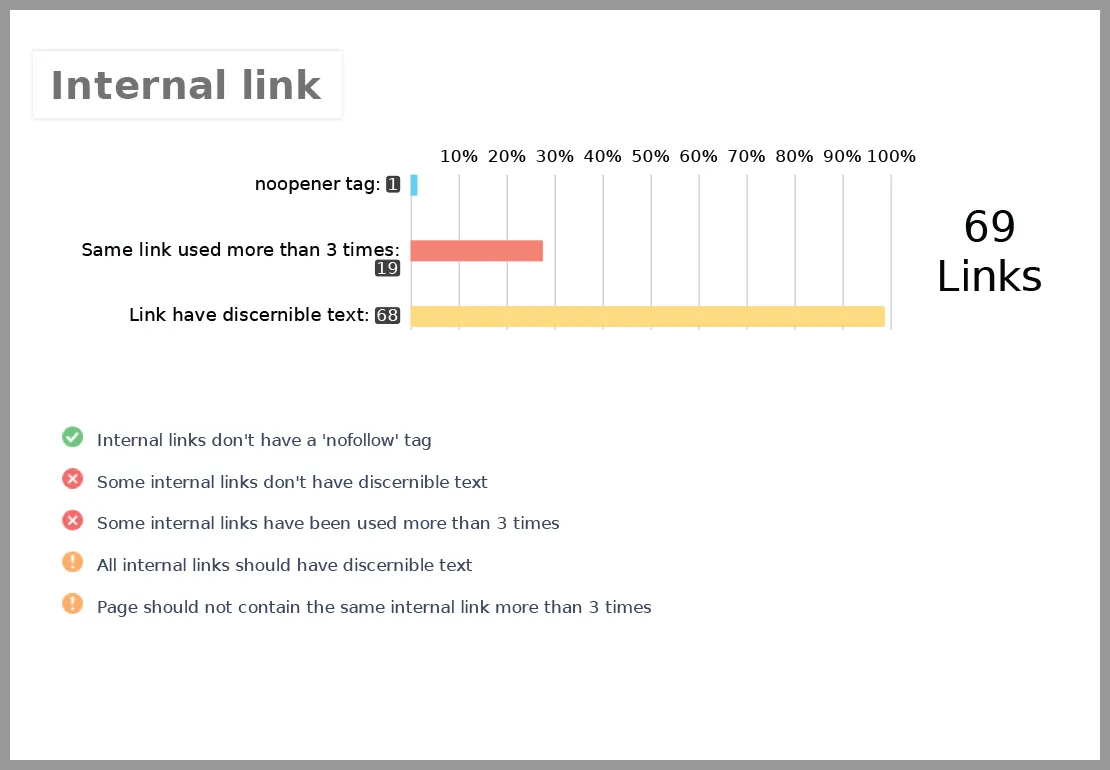
The first step for improvisation involves which internal links you already have.
Running through an on-page audit you will find out all the internal links containing their anchor text, Rel Attributes.
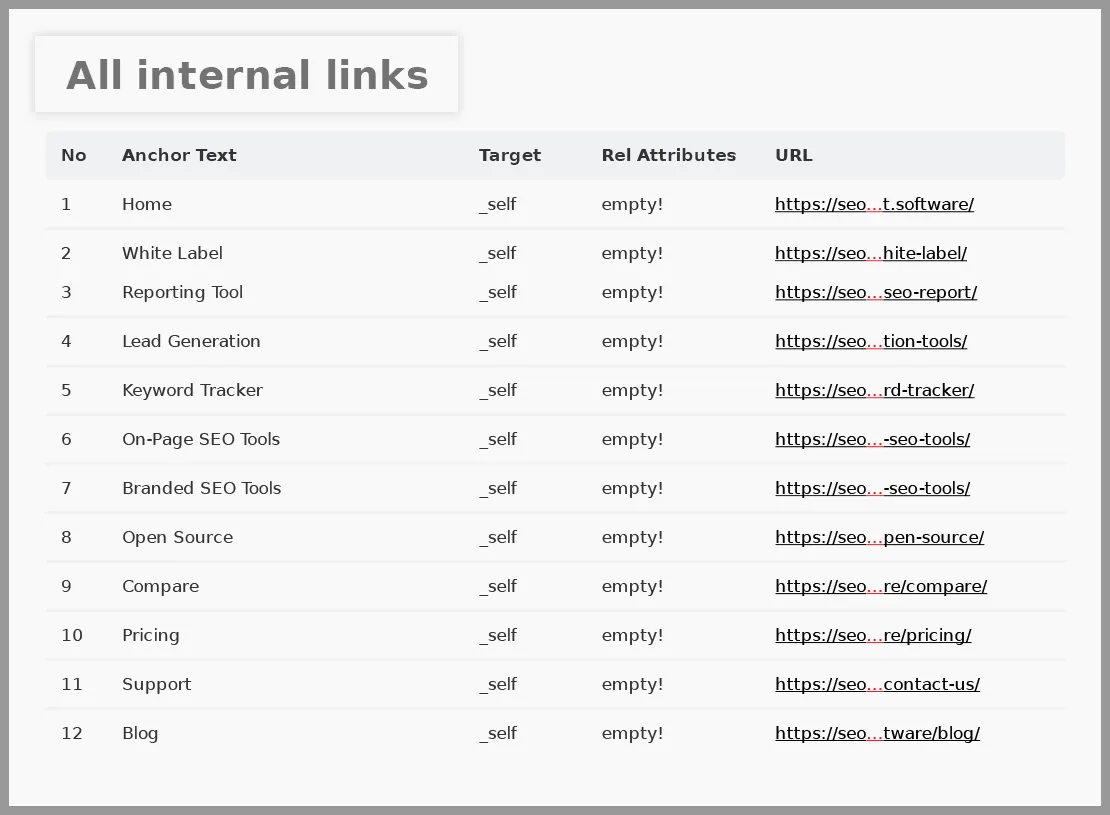
Don’t put too many internal connections to the content that targets low-volume keywords. Also, find out if your priority content lacks internal linking. Focusing on relevant, original content pages brings you the expected results.
Internal linking should be done in a logical way. Maintaining your site structure.
Underneath your homepage, there should be your high-priority category pages. Then the individual pages for each category.
Make sure your low-targeted pages are connected with high-priority pages. It gives an SEO boost and makes it easier for navigation.
As you add new content to your site. You should prioritize increasing your internal linking by linking to key relevant pages.
However, keep your site structure in mind. Avoid excessive cross-category linking.
Analyze the Existing External Links
By adding relevant link profiles, external linking definitely helps the user experience.
Adding external links in the name of learning more facts and information, keeps your visitor hooked to your page. It builds credibility to your site.
The link equity of external links is not the same as internal links. In some cases, external links are more valuable.
The first step of optimizing external links starts by running a thorough analysis.
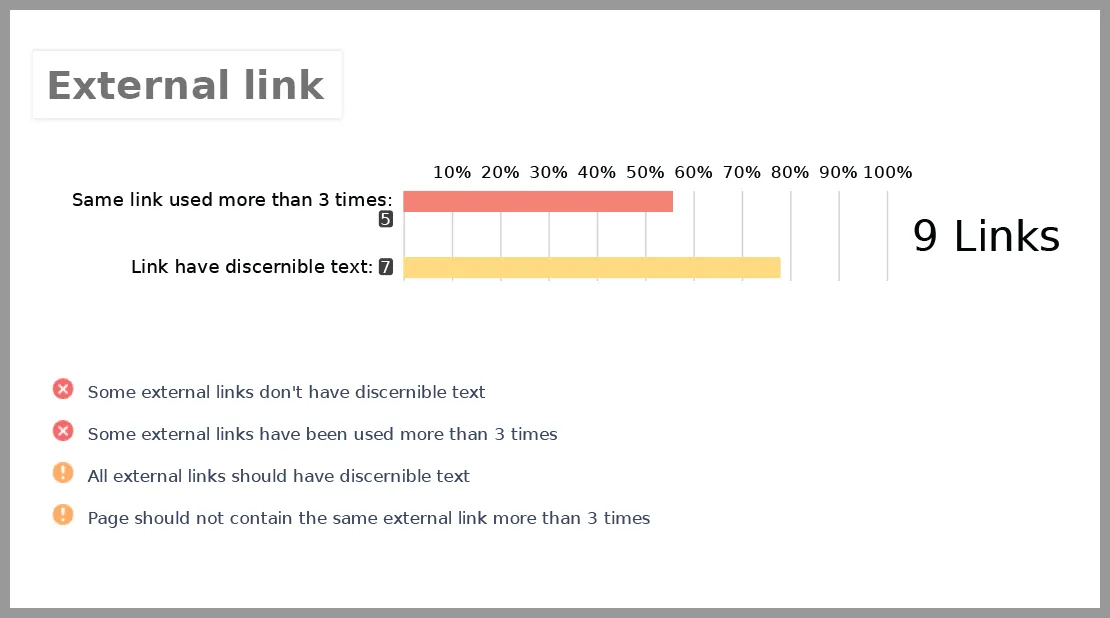
Going through the health condition of your existing external link profile will give a heads up of what to do next.
You’ll also be presented with a total list of external links. So you’ll know which links are coming from where and what their anchor text is about.
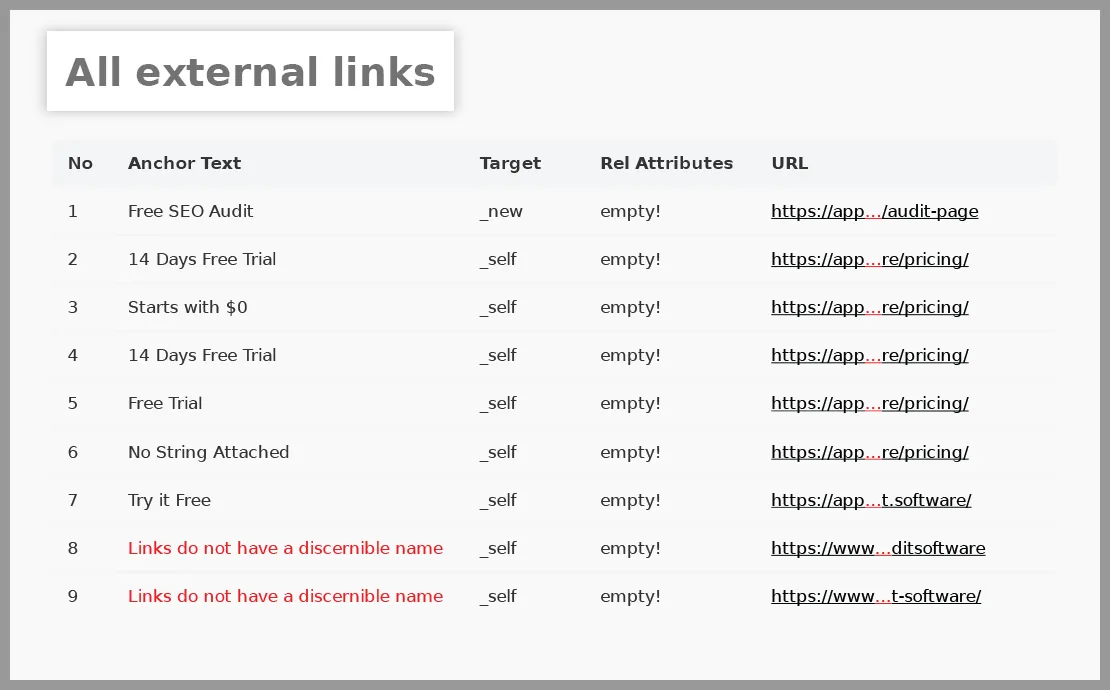
It helps you to learn about the external links you currently have on your page with the Anchor Text and Rel Attributes.
External linking doesn’t always mean linking to a high-authority site. If you have any other relevant content or site externally, you can link to your page. So your audience will be aware of that content or page.
Make sure all the links are crawlable and have proper anchor text. Not spammy. Also, it doesn’t have nofollow, noindex issues, and is not broken.
12. Analyze the Backlink Profile
Analyzing and maintaining a strong backlink profile is a part of Off-Page SEO. In this case, you need real backlinks to acquire real payback.
Before starting that, analyze your existing backlink profile. Sorted out which links carry more value to your site and which don’t.
There are numerous tools available to assist you in performing a backlink audit. We’ve used Ahrefs to get a sense of our total backlinks in this case.
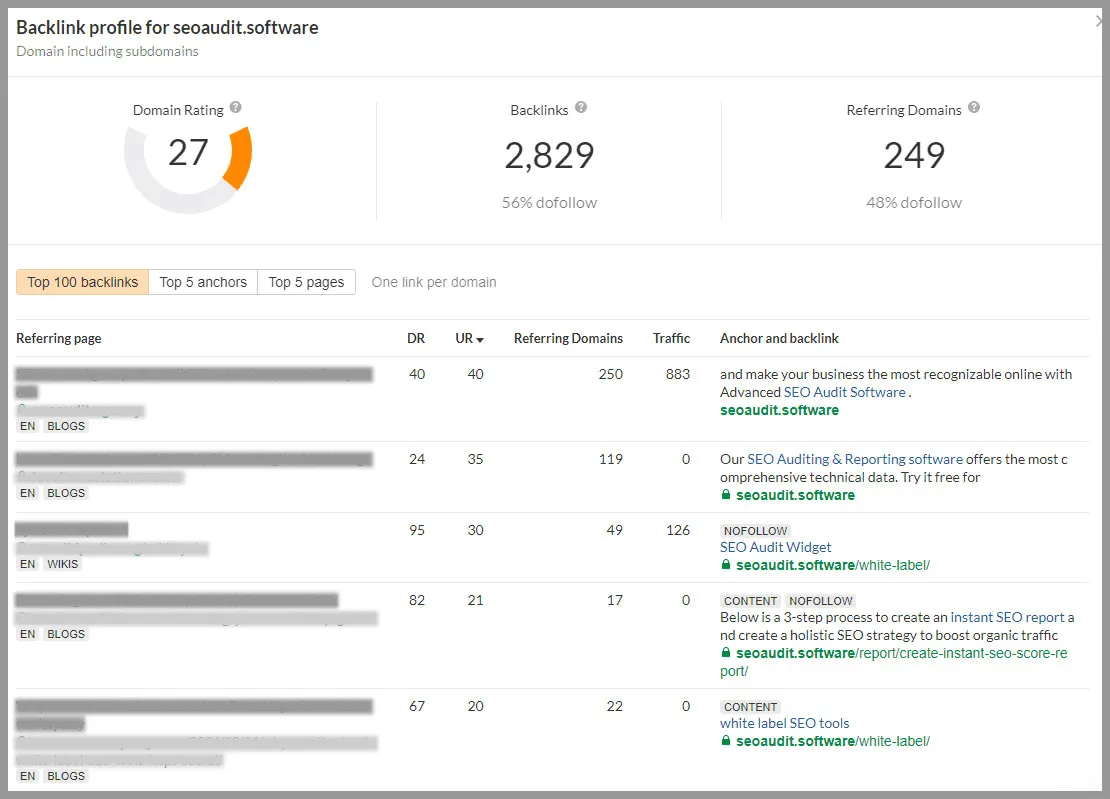
You can see the overall amount of backlinks we have alongside the referring domains. You will be given an overview of the domain rating, traffic rate, and anchor text for the site.
- The audit report will help you to assess your current backlink profile. Make yourself aware of which links are harmful and which are not.
- You can find the opportunity where you can concentrate your efforts to obtain more high-authority backlinks.
- You can compare the quality of backlinks with your competitors. Use that opportunity to outperform them. There are so many backlink tools that help to check your competitors’ backlinks. When you do that you literally have a potential goldmine. Based on that you can also acquire the same backlinks or even more valuable ones.
Also by researching out to the industry leaders in your niche, you can perhaps create a solid strategy. Make connections with them through email. If they have content sharing options do that. By doing so, you can build backlinks organically.
13. Detect and Fix Broken Links
While crawling your page, you can easily detect the percentage of broken links your page has. Broken links sometimes accidentally happened due to deleting orphan pages.
By using the Google search Console → Coverage section, you will find your indexing report. Based on that report you can easily find out your valid pages, excluded pages, and warnings.
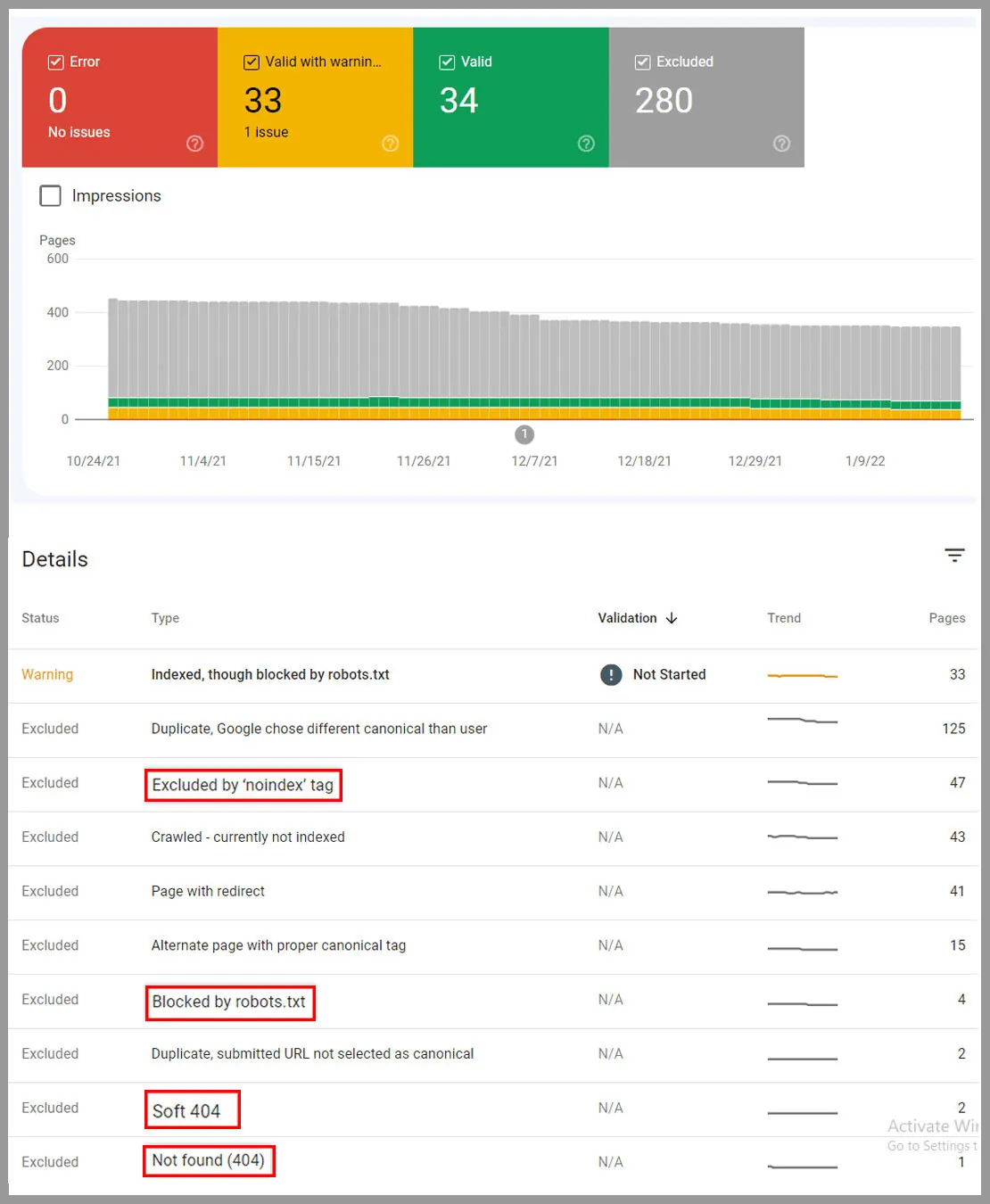
Just like we find out how many errors we have. Fortunately none.
Here you can see what pages have 404 errors or are blocked by robots.txt.
If these are done intentionally, you don’t have to do anything.
But if it contains the pages you want to rank. Then you need to get back those pages ASAP.
Next use any broken link finder tool to scan web pages for dead hyperlinks.
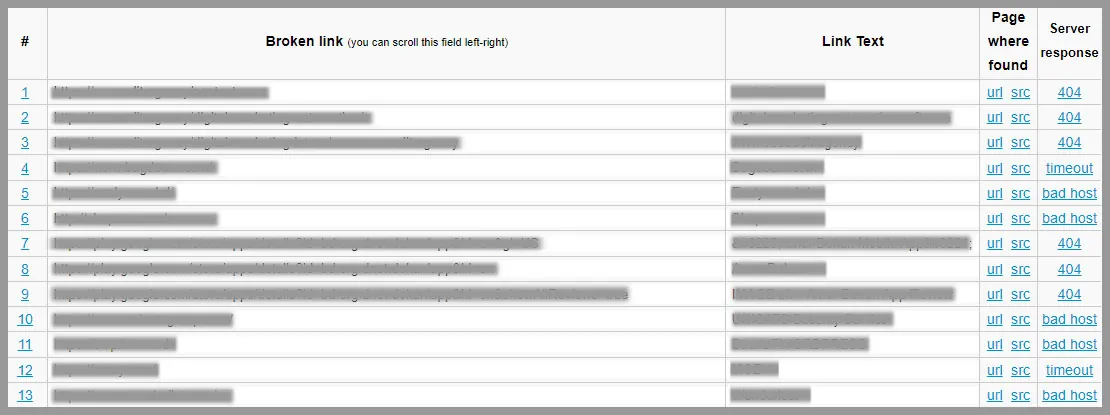
Using Online Broken Link Checker, we have found all the dead links we have with 404 errors and unsuccessful HTTP response codes.
You can use other tools as well for doing the broken link checking. Such as Screaming Frog. Once the crawling is done you can view the 404 broken links issues.
Now view the sources of broken links to fix them.
For easier access export the data into a spreadsheet where you can view the source and broken links list.
As long as you are working towards fixing all your broken link issues, you are good.
14. Detect the content gap
It’s no surprise that on-page SEO is necessary.
Having stated that:
We assume that you are not sitting for optimizing every page of your website.
And if you are, let us clarify that you don’t have to do that.
Just identify the important pages for ranking. Thankfully as you have done the keyword performance tracking you already know that.
Let us go through it again. For identifying important pages look at the,
- Traffic Growth Ratio
- Target Keyword List
- Have the potentiality to Rank on Top
Now that you have defined which pages will go for deeper analysis. Let’s start the content analysis
Today, you need content that makes sense to the audience.
That means if your target pages have this lacking, improve it.
Some suggestions for website content,
Breaking down content into relevant H-tags (H1, H2, H3, H4, H5, H6, and so on..)
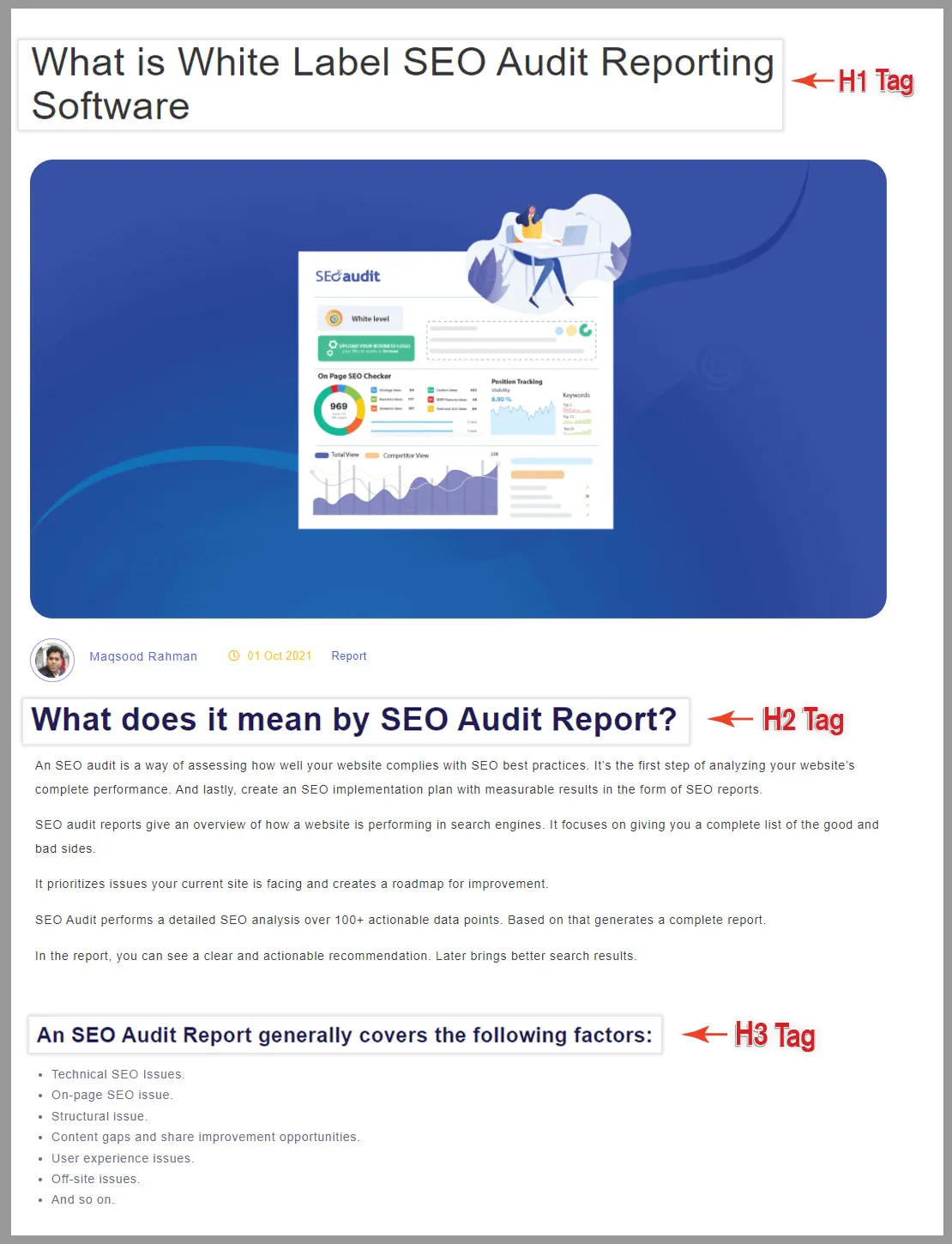
Correct formatting in the content is what readers and Search Engines want from a website.
Fresh, concise content that strikes a nice balance between SEO and relevance
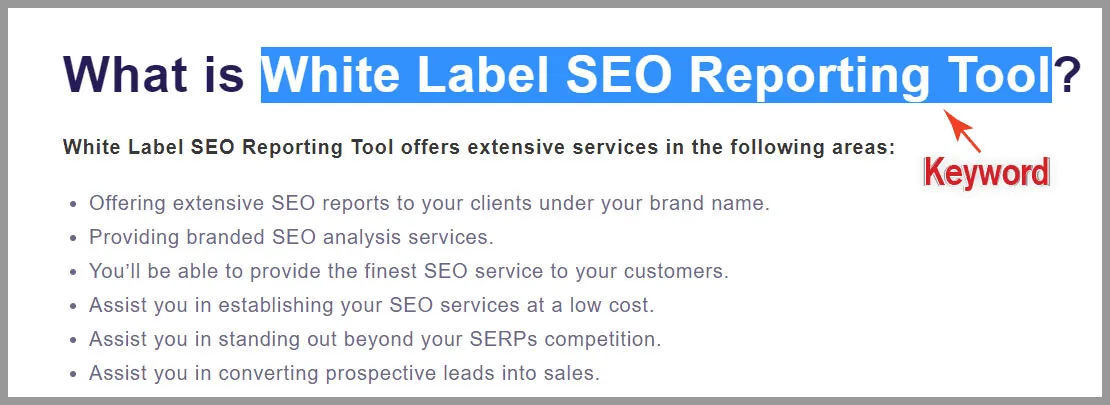
Such content helps to boost your ranking possibilities. Audiences can consume those content better.
Make use of Image and Video
Such elements make the content much more enjoyable to go through. It helps your audience understand better.
For example, check out the below screenshot.

The combination of video and graphics makes this page easy to go through. Plus the content is readable which increases the page average dwell time.
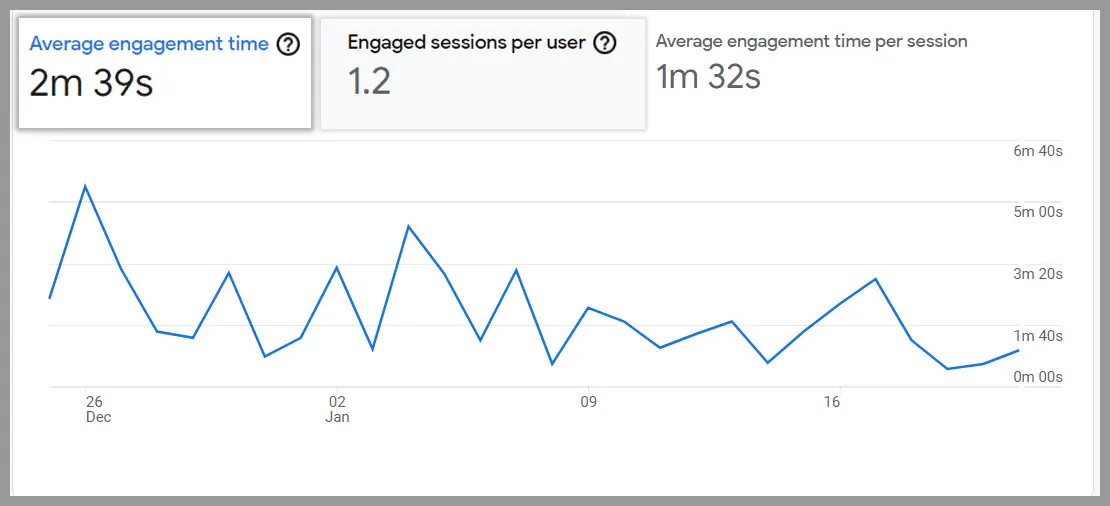
Furthermore, Global Media Insight reports that the average time spent on a page across industries is 62 seconds.
Do the Competitor Analysis
It always suggests writing and publishing such pieces that have a fighting chance in the SERPs competition.
Actively analyze your page content against your competitor’s page. See what you’re lacking and what improvement you can bring.
Ensure your content is Grammatically correct and has a good Readability Score
It’s really important. Nobody wants to read a piece that is packed with grammatical errors. And it’s difficult to get to the core of it.
A high readability score is an important factor in online content. It can significantly boost your site’s SEO ranks. It is the process of making your content understandable and easy for your audience to grasp.
You can check your content’s grammatical mistakes and readability using the following tools.
Not to mention SEO Audit Software helps to analyze the content readability from SEO Perspective. The result shows something like this:
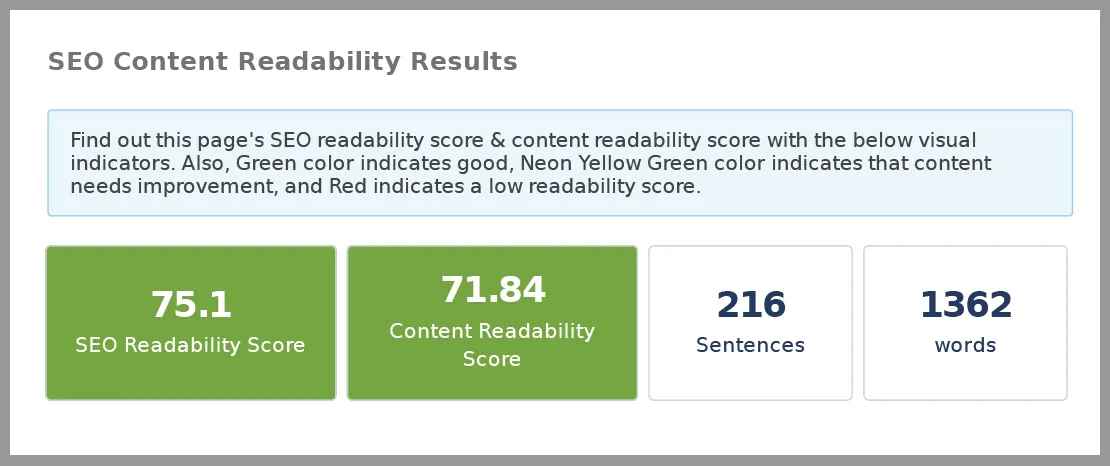
It utilizes 7 important metrics to assess the readability of the content. As you can see from the screenshots, it later analyzed the content from an SEO standpoint and subsequently offered two scores.
Not only that, but you’ll find out how many complex words are in the content. With this result, you can quickly optimize your SEO content.
Is not copied
That’s really important. Plagiarism content has a negative impact on your SEO. Site crawlers and bots can also detect plagiarized content. As a result, your site will stop getting crawled or indexed by Google. And if not indexed. No one is gonna find you on search engines.
So be very careful of what type of material you’re publishing on your website. Higher ranking can only be possible with original content.
To avoid plagiarism, run your content through an app like Copyscape before posting.
Improve your Old Content
According to research, fresh, new content outperforms outdated content in SERPs. Updating will help you earn new followers and improve your ranking. Infuse new ranking factors into your old content.
You can update the old content in the following ways:
- Update the internal and external linking. It brings back the content’s lost relevance.
- Update your title and meta description infusing new keyword optimization techniques. It will boost your content SEO.
- Integrate new format.
- Data is always changing. Renewing data is a constant flux. It gives your content an ‘Evergreen’ title.
For example, in this blog post, we constantly update the data every month.
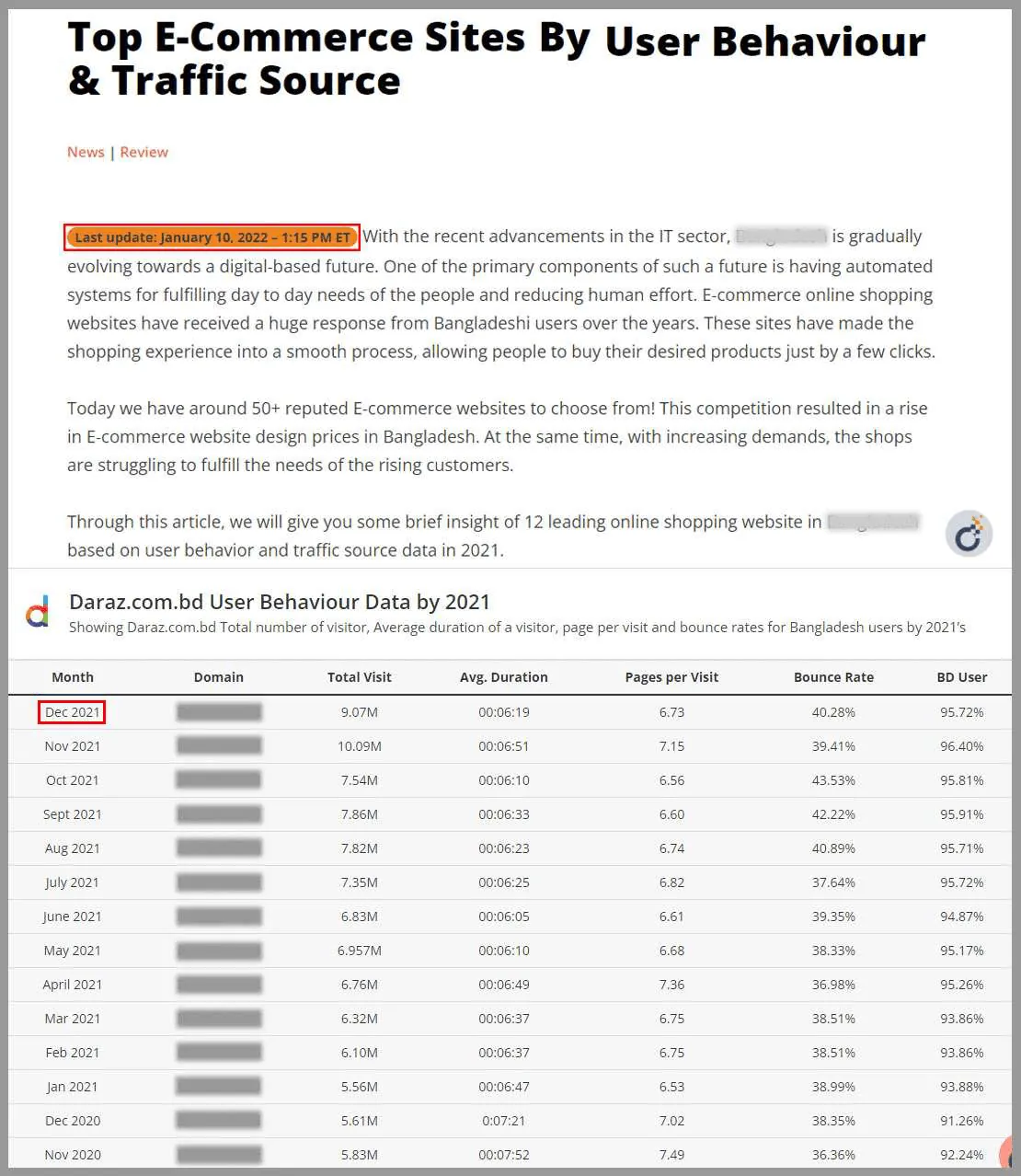
And we can proudly say that it generates the maximum amount of impressions compared to our other pages.
Therefore, keep on adding value to your old content. It will always shine through.
15. Optimize your UX
Another important factor for Google Ranking Algorithm is optimized UX. Google’s ranking systems aim to reward pages that give people a good experience.
Why?
Because Google gives your rankings a huge boost if you can make your user happy.
Now how to improve your UX?
Some simple habits can change the user experience for good.
- Set an attainable UX goal for your website.
- Build storytelling attributes to your content. User loves to see their problem is solving
- Don’t put unnecessary marketing content.
- Optimize your CTA button. For us, it’s ‘Contact us’ for more details. For others, it might be the pricing page. Decide which call-to-action is working for you. You can do the A/B testing to define which works best.
- RWD is the current need. Responsive web design is what you need to do for an optimal viewing experience.
- You can add interactive chat features to improve your UX. It helps to build brand credibility and trust.
For eg, taking one of our previous posts into consideration. You’ll see we have added a table of content. It’s now easier for users to go through the blog. Or, easily navigate to the section they are interested in.
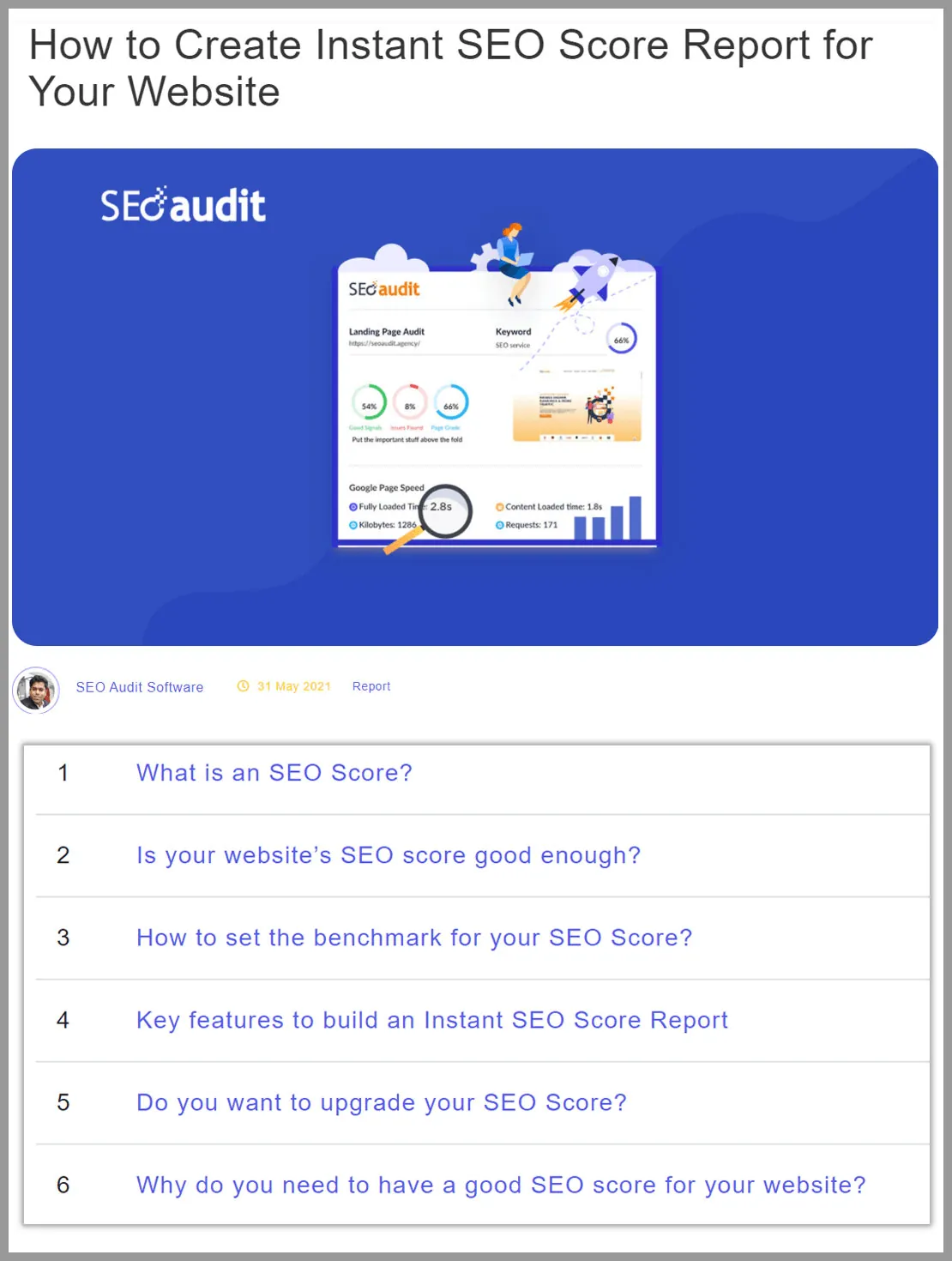
We have also added a quick SEO score checking advantage here. So while reading this article, users can do a quick run-through of their website SEO score.
Also, we have presented the screenshots more interactively. It helps to grab the right users’ attention.
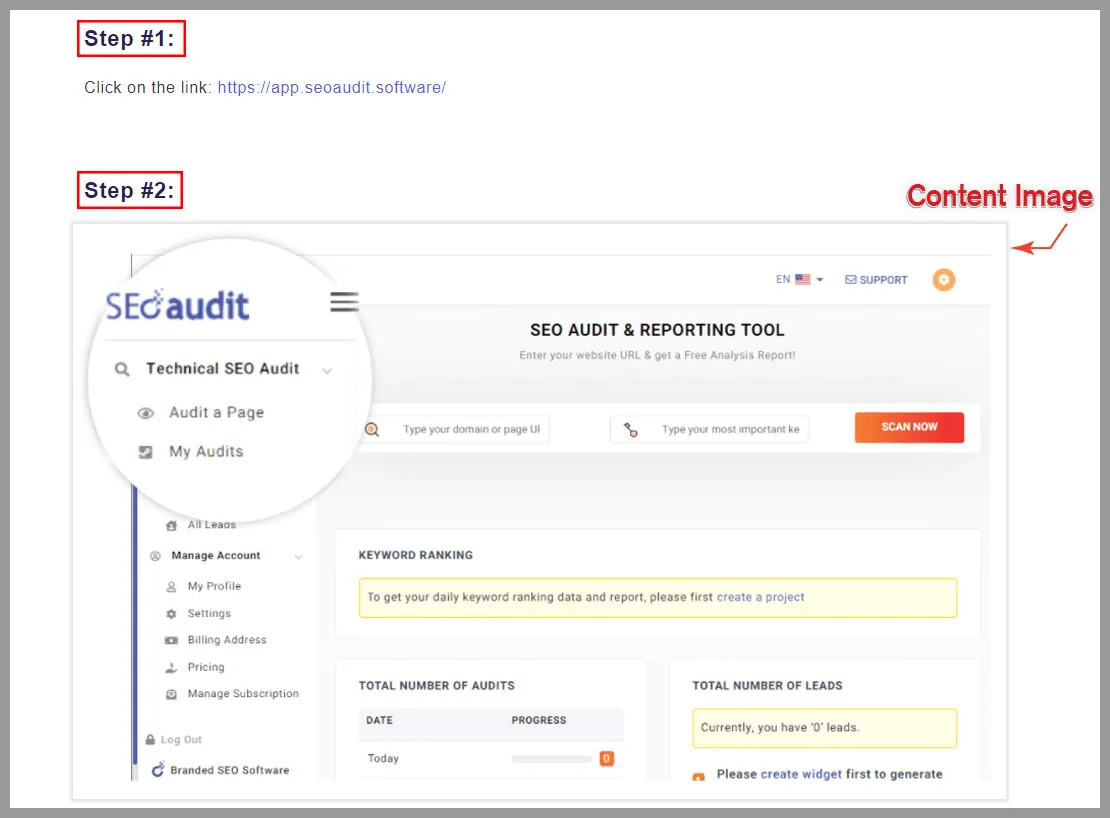
Above all, we do not just write content. We include actionable steps. So it’s a perfect fit for anyone who is looking for a solution for creating an SEO score report.
Since now my content is optimized to make the user happy. It quickly hit the top spot on Google.
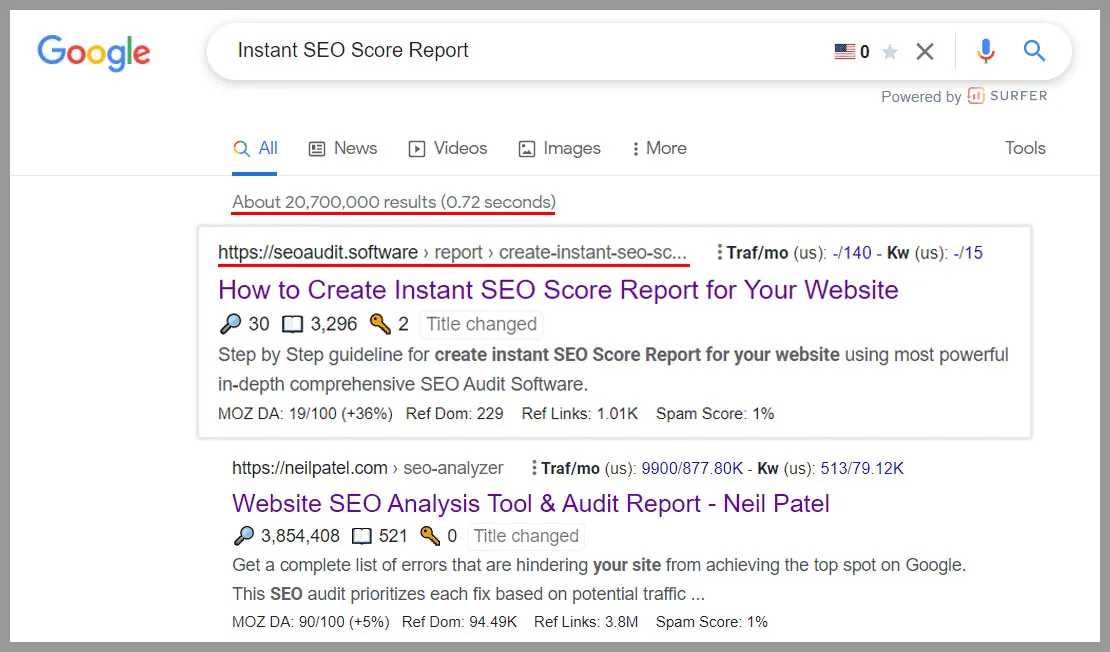
Among 20,700,000 results, we have ranked in number 1.
You can also achieve that. Just optimize your content or webpage with the current user’s needs.
You will make your user and Google happy.
16. Monitor progress of Site Audit Results & Track Keyword Performance
After completing all the steps and making necessary changes, it’s time to monitor the progress.
If you make adjustments during this audit without measuring the results. Seriously, you’re just blindly trusting SEO will work automatically. You wouldn’t know whether the SEO Audit work is actually working or not.
So what are you gonna do now?
Using SEO Audit Software your audit report will automatically be saved. All you have to do after 1 month, run the audit once again. Then side by side do the comparison.
You’ll see what progress you have made in terms of optimization. Then check out the keyword ranking performance. Although this software lets you know about your ranking update. You will know what were your previous month’s rankings vs now.
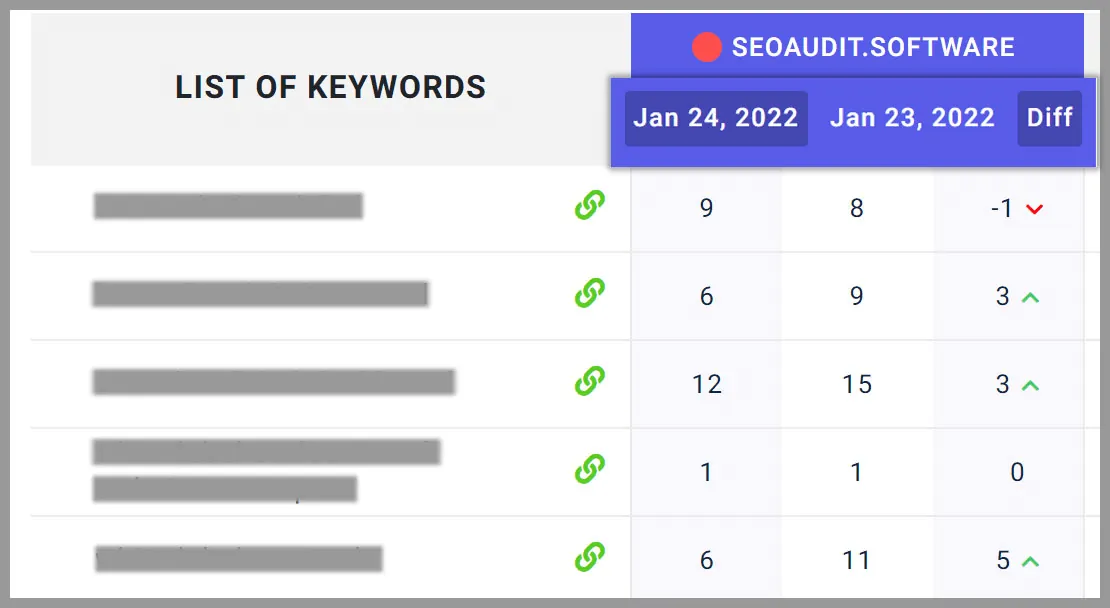
Just as we did. You’ll notice a gradual improvement in our keyword ranking performance. It is possible that your ranks will fall. Simply give SEO some time. Stick to the SEO efforts and continue catching & fixing errors. You will surely meet your expected goal
Consistency is the key. When Search engines see that your site is making the right effort. It unquestionably elevates you to the top of the heap.
What’s new in 2026: what has changed since this guide was written
The 16 steps above still apply. These tools and guidelines have changed since the first version of this guide:
- Core Web Vitals: Interaction to Next Paint replaced First Input Delay in March 2024. Good scores are Largest Contentful Paint of 2.5 seconds or less, Interaction to Next Paint of 200 milliseconds or less and Cumulative Layout Shift of 0.1 or less.
- Mobile testing: Google retired the Mobile-Friendly Test and the Search Console Mobile Usability report in December 2023. Use Lighthouse in Chrome DevTools or the mobile results in PageSpeed Insights instead.
- Structured data: Google’s Structured Data Testing Tool was replaced by the Rich Results Test and the Schema Markup Validator.
- E-E-A-T: Google’s quality rater guidelines added “Experience” to Expertise, Authoritativeness and Trustworthiness in December 2022.
- AI search: answers in Google’s AI Overviews and in assistants like ChatGPT, Gemini and Perplexity are now part of search visibility. The SEO Audit Software app runs a GEO audit for AI-search readiness and can check whether AI assistants name a client.
- Whole-site crawls: to find broken pages and redirects across a site, the app can crawl a whole website, up to 1,000 pages per crawl.
For a current, step-by-step version built from a real audit, see our SEO audit checklist for 2026.
What should your SEO audit strategy be?
In this article, we’ve covered all the necessary steps you can do to boost your Google rankings in 2026.
Don’t get overwhelmed by the steps. Meet the critical aspects mentioned above one by one. And tackle them. You will soon meet the missing success on your site with your SEO effort.
Ready to run your own audit and share the findings? Try our SEO report generator for agencies.
Frequently asked questions
How long after an SEO audit will rankings improve?
There is no fixed time. Google has to recrawl and re-evaluate the pages you fixed, which can take days for important pages and weeks or longer for the rest. Technical fixes, such as unblocking pages or fixing redirects, tend to show first; content improvements usually take longer.
How often should I do an SEO audit?
Run a full audit at least once or twice a year, and check key pages after every big change, such as a redesign, a new theme or a site migration. For client sites, a monthly check of priority pages catches new problems early.
Can an SEO audit hurt my rankings?
No. An audit only reads your pages. Rankings can drop if fixes are made carelessly, for example by removing pages that bring traffic or changing many URLs at once without redirects. Change things in small steps and measure the results.
What is the difference between a technical SEO audit and an on-page SEO audit?
A technical audit checks whether search engines can crawl, render and index the site: robots.txt, sitemaps, redirects, speed and status codes. An on-page audit checks each page’s content and tags against the keyword it should rank for. Our on-page SEO audit guide covers the second part.