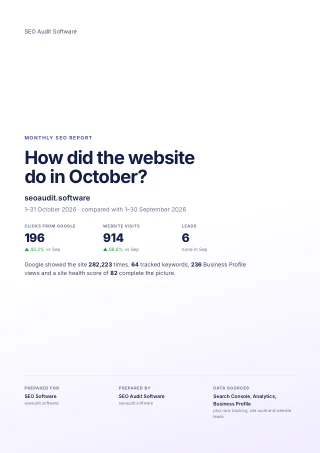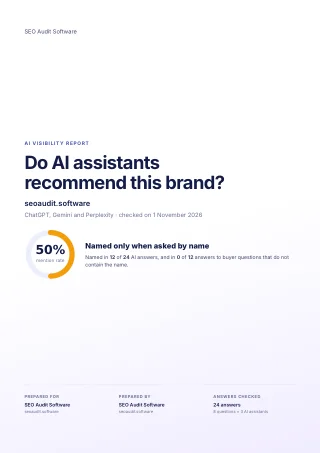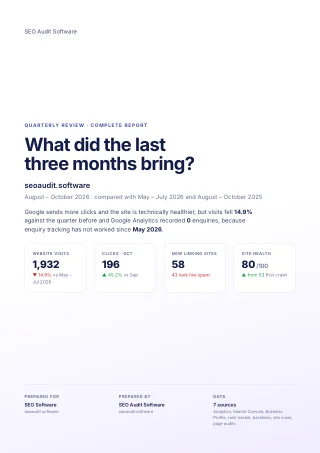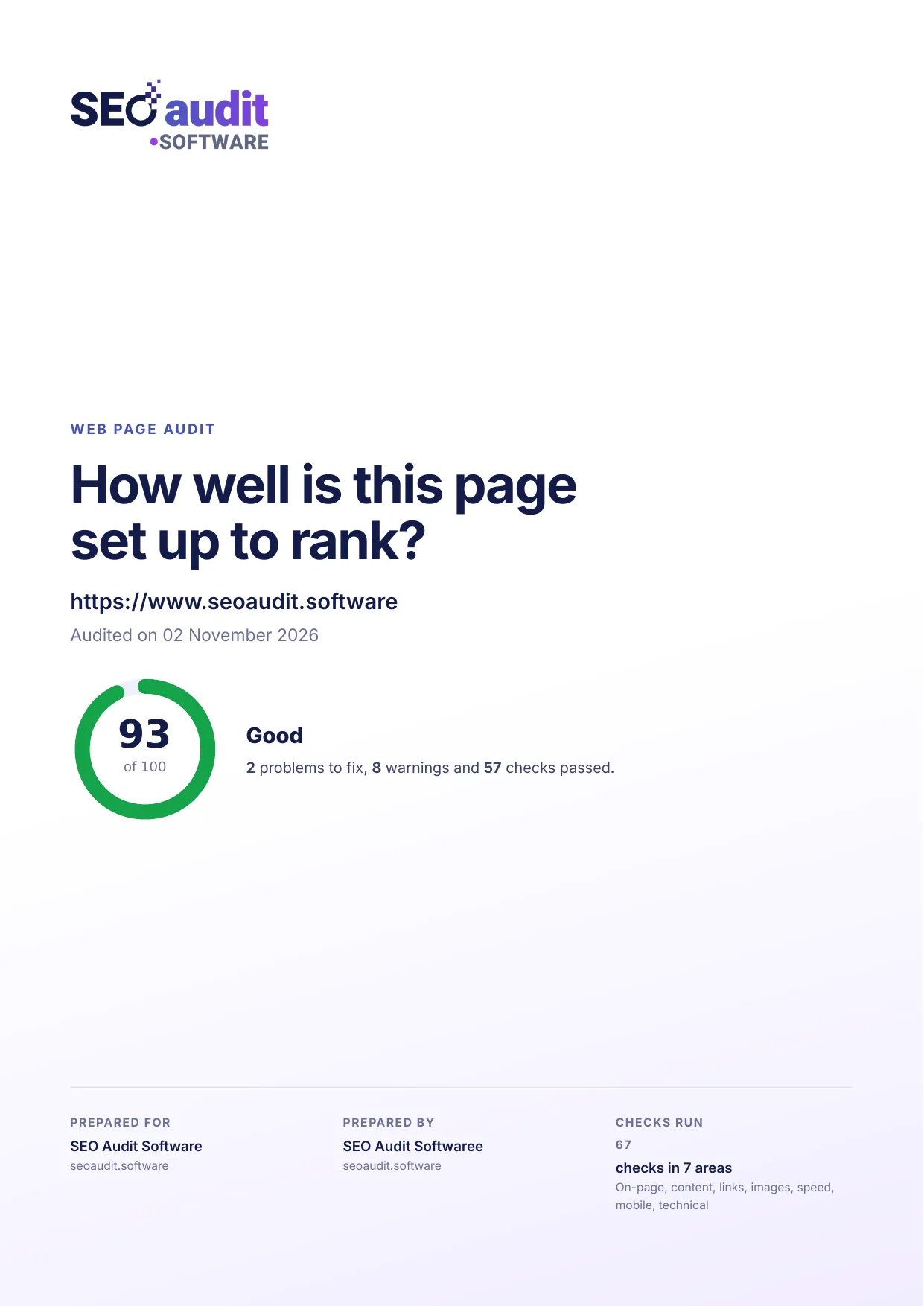
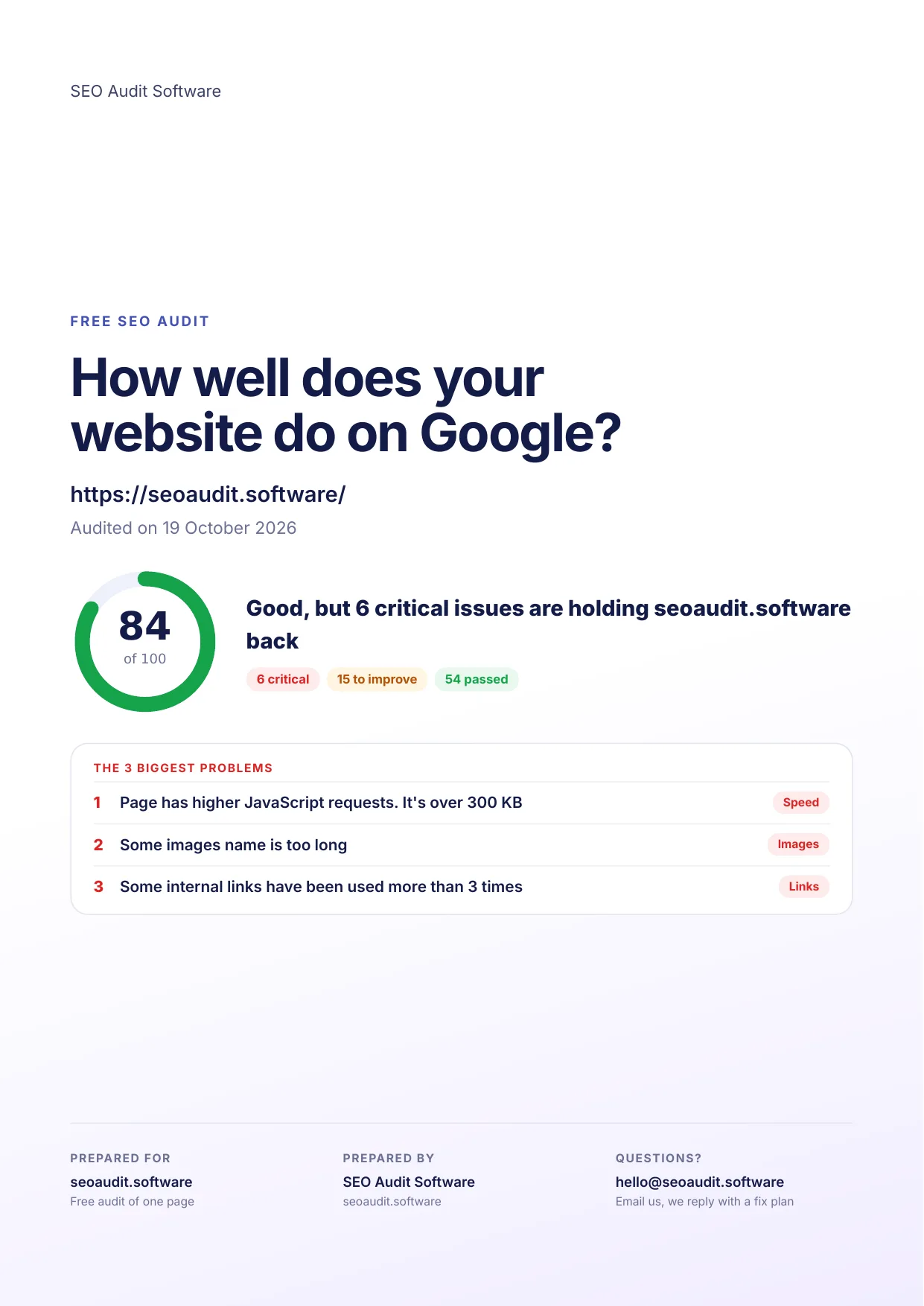
Quick answer: To generate a free SEO audit report in PDF format, start the 14-day free trial of SEO Audit Software (no credit card needed), run an audit of a page and its target keyword, add your logo under White label, and click PDF on the finished report. A basic audit usually takes under a minute. To see the result first, open one of the sample PDF reports below, or run a quick check with our free SEO analysis report tool.
Key takeaways
- A good SEO audit PDF lists what was checked, what is wrong, why it matters and how to fix it, in language a client can follow.
- SEO Audit Software creates a PDF from any finished audit: Keyword Score, Web Page Audit, or the + versions with Google Lighthouse for desktop and mobile.
- White label settings put your logo, brand colour and contact details on every PDF, and you choose which of the 13 report sections appear.
- The 14-day free trial needs no credit card. Current plans and limits are on the pricing page.
Have trouble generating professional-looking website audit reports? Want a comprehensive audit report but don’t have a budget for it? Then a Free SEO Audit Reporting tool is just what you need.
A report generator tool like this is useful equipment for your marketing agency. It generates free PDF audit reports that illustrate the SEO performance of your websites.
An SEO Report demonstrates the performance of your SEO efforts. Acquire valuable metrics on the approach that you took. And lastly, share recommendations on how you can improve your virtual presence.
Our goal here is to figure out what a good free SEO Audit PDF report looks like and what it includes. Download and inspect our updated, agency-ready sample PDF reports:
What is free SEO Audit Report in PDF Format?
An SEO report guides you with the following information:
- What progress you have made so far?
- What tactics have been carried out and what impact have they had?
- Recommendations for accelerating growth.
It’s all about documenting all the key metrics that matter. So it effectively delivers progress against preset SEO KPIs.
Only a great SEO report can bring good SEO results. It is the process of displaying your search engine optimization outcomes. This practice makes your website and its assets more visible on Google.
By getting a chance to work with Free SEO Audit Reporting Tool. You will have the right metrics to get the SEO job done.
If you’re responsible for SEO services for a variety of clients. You should be aware that they’re expecting a data-driven SEO report from you.
By having such a tool, you not only offer them key performance indicators (KPI) in a beautiful PDF format. But also make it simple for them to obtain useful data.
No matter if it’s monthly, quarterly, or annual. You always meet your client’s expectations by providing them with SEO Audit Report in PDF Format.
Where you can find a Free SEO Audit Report Generator Tool?
At present, there are many free SEO reporting tools available on the market. Most SEO reporting tools give a few days as a free trial. At that time, you can use the features for free.
Some tools also provide limited free features for an unlimited time. You can analyze the market and choose what works best for you.
Here we are suggesting SEO Audit Software Advanced Reporting Tool. Using our software, you can customize the report in multiple ways.
Not only that, there is 14 days free trial period. During this trial time, you can use this software’s all premium features.
What’s more? Let’s find out.
What you will get from it? (The features of Free SEO Audit Report)
There is no way to think that if you are using it for free you will have to settle for less. Even the free website audit report tool gives a series of updates and insights. Not to mention you will get Advanced SEO Audit Report. It is powered by Google Lighthouse. So let’s see what this tool offers:
PageSpeed Analysis for both Desktop & Mobile:
PageSpeed is the issue most people struggle with. But now you won’t.
In the advanced report, you will get help to perform a detailed analysis for both mobile and desktop versions.
You will get PageSpeed analysis that is powered by Google Lighthouse. The report includes First Contentful Paint, Largest Contentful Paint and Cumulative Layout Shift. (Google’s three Core Web Vitals are Largest Contentful Paint, Interaction to Next Paint and Cumulative Layout Shift.)
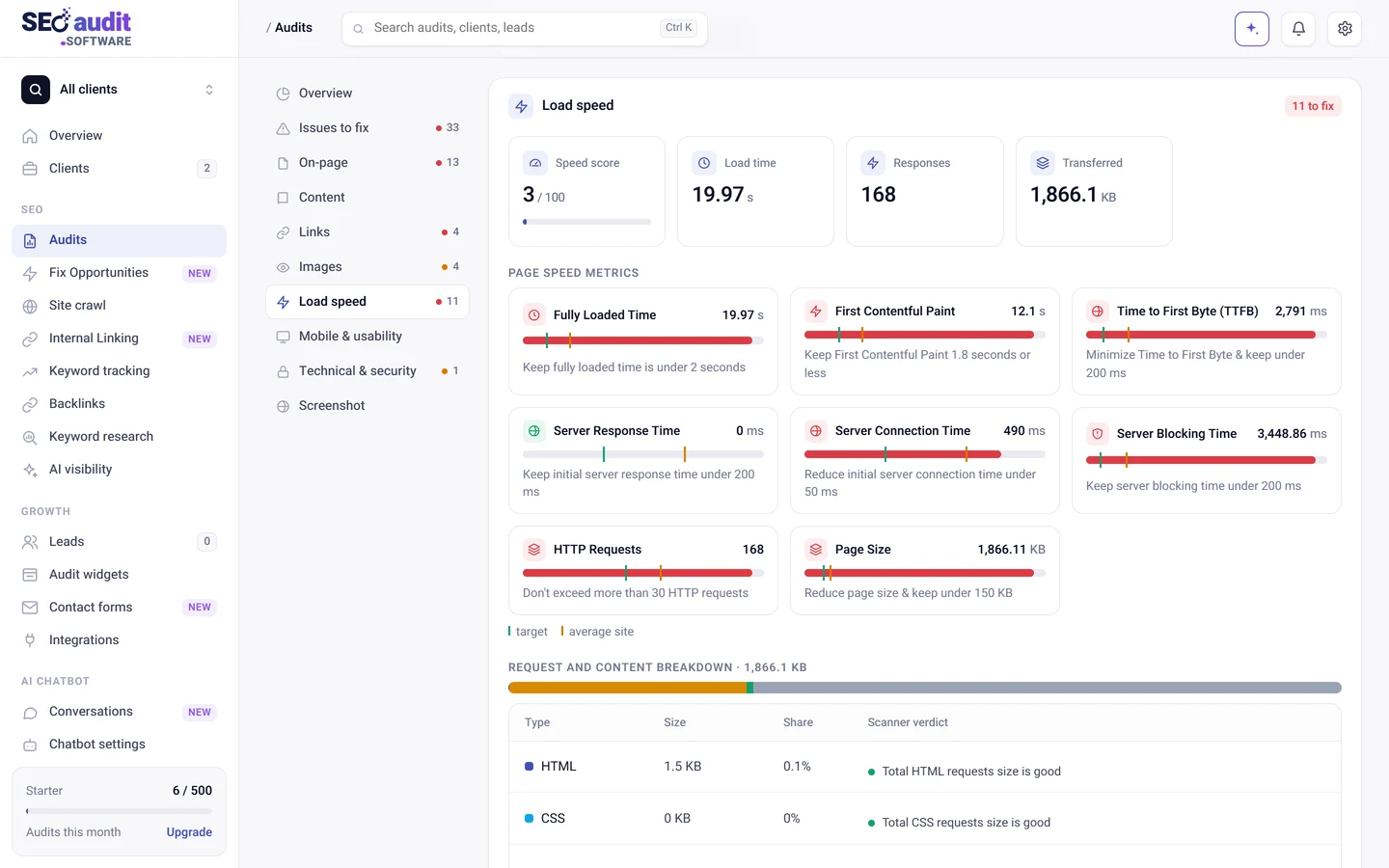
You can also get reports on total blocking time, speed index time, and time to interactive time.
The metrics are for each version of your website; both desktop and mobile. By doing so, you can identify the issue and concentrate on what matters. For example, fixing the mobile version first and then improving the desktop version.
150+ SEO Reporting Metrics:
The report will comprehensively tell about the websites’ on-page and technical SEO scores. These metrics can be used to decipher the hidden indications – that online traffic and their behavior give us.
Numbers don’t lie. The score of the website is vital for you to make a statistical decision. Metrics such as,
Page Performance Metrics.
SEO Content Readability Check.
HTTP Requests & Content Breakdowns.
-
Image Requests
-
JavaScript Requests
-
HTML Requests
-
CSS Requests
-
Other Requests
-
On-Page SEO Statistics
-
Javascript Code Analysis
-
Document Object Model (DOM) Analysis
-
Frameset Tag
-
‘noindex’ meta tag
-
Canonical URL
-
Disallow Directive
-
Robots.txt file
-
‘nofollow’ meta tag
-
Favicon
-
Meta Refresh tag
-
Nested tables
-
URL redirection issue
-
Deprecated tags
-
Server Signature
-
Inline-style
-
Total words on the page
-
Webpage character set declaration
-
Total characters on the page
-
- Mobile Usability Analysis.
- URL, Title, & Meta Tag Analysis.
- Image Analysis.
- H-Tag Analysis with the keyword relevancy chart.
- Most Important Keywords used on the page.
- Internal & External Link Analysis.
- Technical SEO report.
Analyze Website SEO Content Readability:
That’s the amazing feature that the free SEO Audit Report offers. Now, along with knowing your content readability score, you will also know it from an SEO standpoint.
As a result, you will receive two scores: one for just readability and the other for SEO readability.
You will receive the following metrics in this report:
- The reading ease scale.
- Content Readability level.
- Gunning Fog grade based on reading proficiency for the content’s complex sentences.
- Grade based on the reading experience.
- Coleman Liau Index, a measure of the text’s usability.
- Automated Readability Index.
- Lastly, the text’s level of the difficulty scale.
Technical SEO Report:
Not only now you know the on-page and off-page issues, but here’s advice for you on the technical side as well. It helps you check various technical parts of your website.
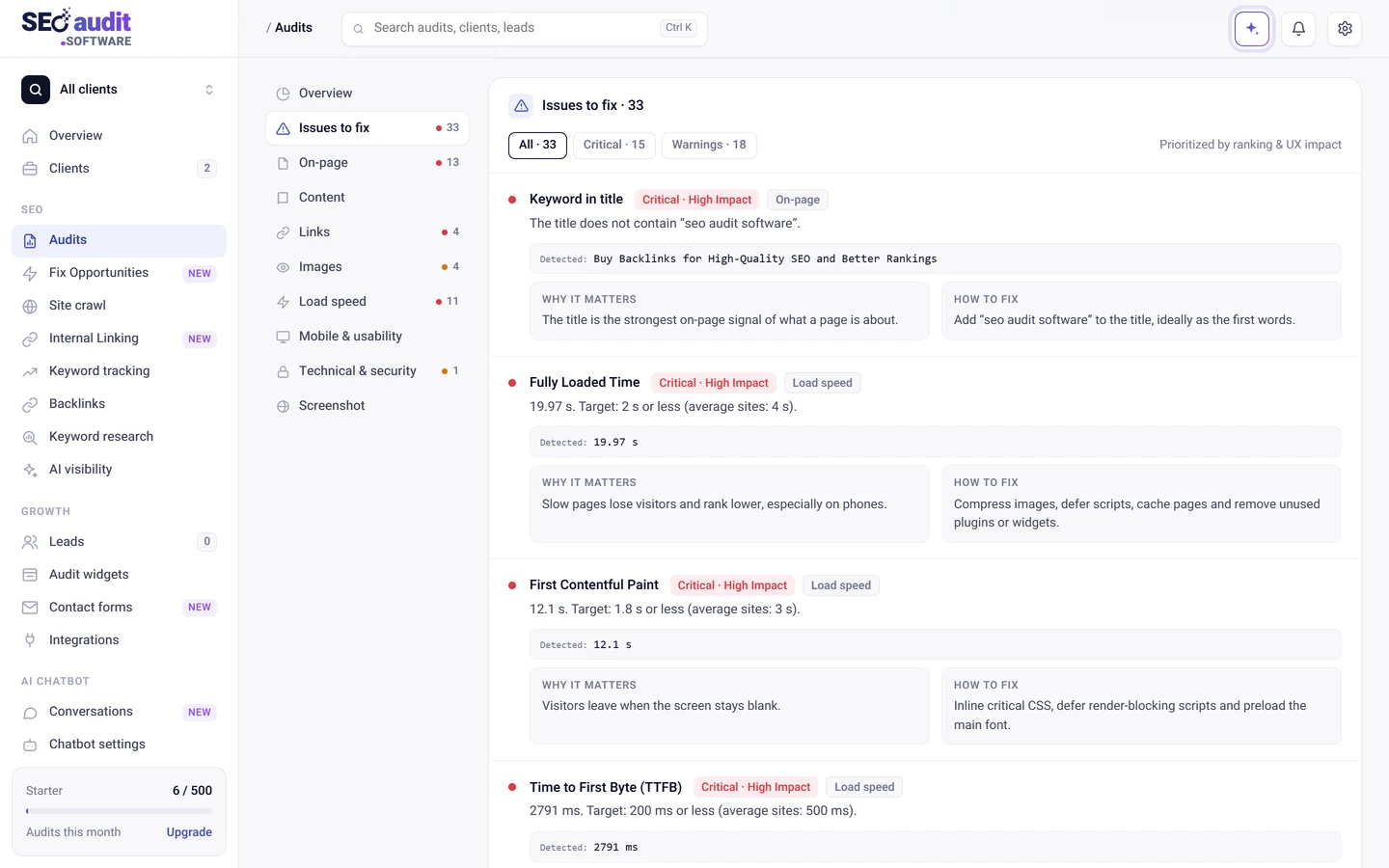
These technical parts show the SEO elements in 3 important sections. Warnings, Recommendations, and Passed Audits.
All issues for a website will be displayed in the “Warning” section. It shows how you can fix each issue to maintain the best user experience.
Next the Recommendation section. It shows how to make your websites more accessible. Here you will be recommended what to improve.
Finally, the “Passed Audit” sections will show those data which is okay. No need for further optimization.
That being said, the Technical part of SEO plays a big role. Within this free SEO Audit Report, you can quickly get the following important SEO suggestions.
-
Eliminate render-blocking resources.
-
Reduce unused CSS.
-
Initial server response time.
-
Serve static assets with an efficient cache policy.
-
JavaScript execution time.
-
Links crawlable issue.
-
Minify CSS.
-
Enormous network payloads.
-
Properly size images.
-
Defer offscreen images.
-
Video formats for animated content.
-
Lazy load third-party resources with facades.
-
User Timing marks and measures.
-
Avoids unload event listeners.
-
Avoids document.write().
-
Uses passive listeners to improve scrolling performance.
-
Largest Contentful Paint image was not lazily loaded.
-
Minimize third-party usage.
-
And many more.
Clean UI for Quick Info:
We know you’re extremely busy. You want quick and easy access to critical information. Which will demonstrate the effectiveness of your efforts.
That’s our goal here as well. SEO Reports UI gives you an overall succinct view of your SEO effort.
No unnecessary graphs or diagrams here and there. It’s easy, understandable, and written in human language. So not only the SEO professionals, but your clients also easily understand the SEO growth.
Updates of Website Health:
A good white-label SEO report shows the fitness of your website. Whether the visitors are engaging with it or not.
Inch-by-inch analysis of your website needs to crawl the site thoroughly. An ideal SEO reporting tool performs such an analysis on your behalf.
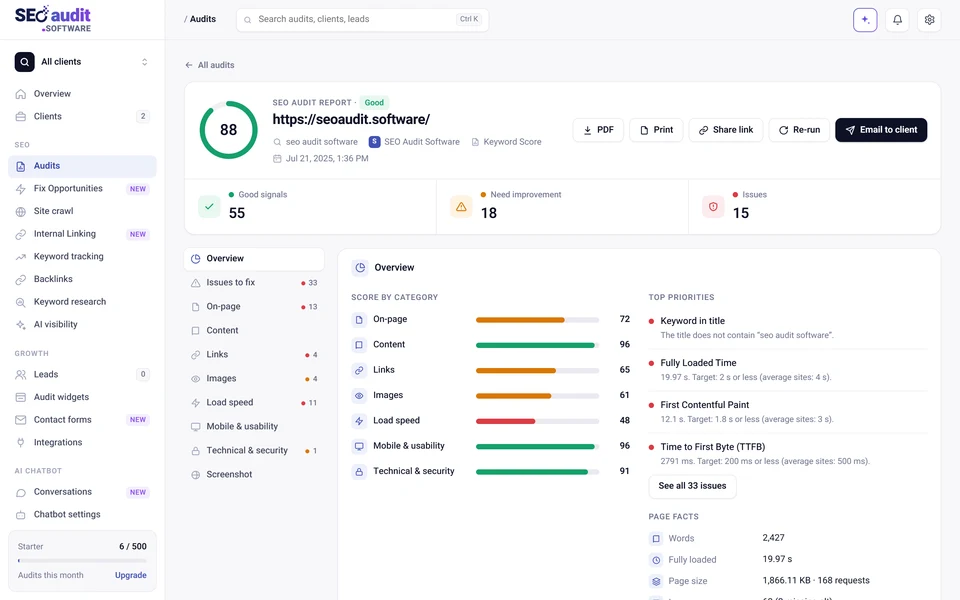
Here’s a screenshot of it.
Any reporting tool you use must ensure that it contains all the metrics that matter. It might vary depending on the industry. The metrics the SEO report contains should indicate your progress, success, and actions. And Free SEO Reporting Tool is very good at doing that.
By the screenshot, you will see how comprehensive that report is. It covers everything you need to know about your website health.
⇨ Page-Level Analysis:
SEO reporting demands a page-by-page analysis of the website. Otherwise, it will not be considered favorable and justified reporting. And will lose its usability. So this tool shares a true picture of your web page. Anyone who goes through it will easily understand the issues the report addresses.
⇨ Analysis of Title and Meta Description:
The title and meta description are the faces of your web page. If they are not engaging enough then the whole content will be ignored by the visitors.
That makes a website weak and less useful. SEO reports contain feedback considering the title and meta-tag analysis. Tools give feedback about their performance according to SEO.
⇨ Image Analysis:
Get down to the microscopic level image analysis in the thorough report.
The SEO reporting tool will provide you with a detailed list of all the images used. You will receive a list of images, each with its own Alt text, URL, and Size.
You can know now how many images are used on the page and their optimization level. That way, you can properly optimize them.
⇨ Heading Overview with Keyword Relevancy:
As an SEO enthusiast, you must understand the importance of heading tags. They give a proper outline to your website content which Google can easily understand.
It makes your page user-friendly. It improves the accessibility and readability of your website for both visitors and search engines.
As they present as a strong signal for SEO, it is important to properly place your most important keywords in the heading.
It is how Google evaluates the context of your content. It’s 1000% worth paying attention to keywords in the heading tags.
That being said, how can you tell if you’re employing keywords correctly in the heading? Advanced SEO Audit Report now tells you that.
It displays the relevance of keywords in your page’s headings in the most interactive way.
You would know whether or not the exact keywords were present in the headings.
Also, understand the percentage of keyword usage.
Side by side you will know if you’re properly using H1, H2, H3, H4,…..H6 tags or not.
As a result, you can easily see which heading tags violate SEO best practices, which need to be improved, and which are fine as is.
⇨ Most Important On-page Keywords:
The ratio of the top 10 most frequently used on-page keywords, which range from one word to four words, is now visible.
Get a list of the top 10 4 words, 3 words, 2 words, and 1-word key phrases used on the page.
Now you can look up the visibility of the keywords in the title, description, H1, H2, and H3 tags.
You have the list, you can easily spot any problems that may exist with the most frequently used terms on your page.
⇨ Get the total external & internal link report:
Links, as we all know, are the foundation of Google ranking. It’s where the organic search begins.
This SEO Reporting tool covers all the detail of your page’s internal & external links that you need.
Within this report, you will know how many internal and external links are used. If you have used the same type of external and internal links and the percentage of the same link usage. And if the links you have used have discernible text.
You will get a basic overview of the types of links you have. Such a detailed list displays Anchor Text, Rel attributes, URLs, and so on.
The best deal comes free:
The best business deal starts with winning a bargain. In this highly competitive era, everyone is desiring to be as cost-efficient as possible.
The more you save from your cost the more profit you earn for yourself. But that doesn’t leave room for compromise on your service quality.
And if you are determined to prepare the best white-label SEO audit report for your client. Then there is hardly any chance to waste your time and money.
In this scenario, free trials of white-label SEO audit tools can lessen your worries. This reporting tool provides white-label SEO reports free of cost for a reasonably limited period.
Features like:
- Branded reports
- Customization
- Comprehensive
- Downloadable in PDF format
All you can get without spending a penny.
Turn to White-label Feature:
SEO reporting is an important aspect of the SEO process. But it rarely includes options for including your own brand logo on your own. Or your clients’ SEO reports.
But SEO Reporting Tool doesn’t disappoint you. You can customize your SEO reports however you like. Demonstrate the success of your SEO efforts, with the in-depth website status report.
Browse the SEO Audit Software White Label Settings. And start creating unique white-label SEO reports in minutes.
- You can add your business logo within the supported image file format.
- You can add your business’s important information. Such as:
- Business Name
- Phone No
- Email Address
- Address
- Footer Content
- You can do basic HTML in the footer section for SEO Audit Report in PDF Format.
- You can even configure the SMTP settings. And can send branded Audit PDF Emails to any client.
Only present metrics that matter:
SEO Reporting Tool offers reporting metrics configuration option.
What it does. It helps to show or hide the metrics on the report.
As a result, you can only display the stats that are relevant to your company. After the configuration, generate the report. Ignore others.
That way you will get an SEO report just the way you wanted it to be.
Include the most important SEO Key metrics and display them in a customized, visually appealing way.
Transform your report into a PDF and wow your client.
All Audit Reports under one roof:
Yes, saves time on manual searching.
By going to app.seoaudit.software → Audits (called My Audits in older versions of the app). You will find all the generated advanced audit reports.
The reports are organized based on the creation date, URL, and keyword.
From here you can copy the link to the generated report for sharing and viewing the report. Or, download it in PDF format. Or even delete it.
What’s new in 2026: the SEO audit PDF today
The features above describe the report as it was when this guide was first written. This is what the PDF looks like in the current app:
- Audit types: Keyword Score checks how well a page fits a keyword. Web Page Audit runs 179 on-page checks without a keyword. Keyword Score + and Web Page Audit + add Google Lighthouse, with Performance, Accessibility, Best practices and SEO scores for mobile and desktop.
- Speed metrics: Interaction to Next Paint replaced First Input Delay as a Core Web Vital in March 2024, and Lighthouse 10 (2023) removed Time to Interactive from the performance score.
- Report sections: you choose which of the 13 sections appear in the PDF, from Summary and Opportunities to Readability, Image analysis and Heading overview. See how to choose PDF sections.
- Monthly client reports: besides single audit PDFs, the app can email each client a white label report every week, month or quarter, with Search Console, Analytics, keyword tracking and lead data. See how to schedule client reports.
To compare report formats and see a full sample, visit our SEO report generator page.
How to Generate a Free SEO Audit Report in PDF Format?
The user manual of the Free SEO Reporting Tool is so simple. I’ll show you how to generate a Free SEO Audit Report in PDF Format. In just 4 simple steps.
Step -1:
To generate an SEO report, you must first log in to this Software and create your profile.
After you’ve signed up, click New audit (choose Keyword Score + or Web Page Audit + for the advanced report with Google Lighthouse) to run a website assessment on your own or your clients’ sites.
You must provide the website URL as well as your important keyword to do so.
Step – 2:
This tool begins to examine the keyword and websites that have been entered. You will usually receive a full analysis report in under a minute; advanced audits take about a minute longer.
This tool helps you to analyze all the underlying flaws of your website.
That’s how you’ll get an Advanced SEO report card with a detailed analysis. You will be given detailed instructions on how to correct the faults. That makes it easier to figure out what’s causing your traffic rankings to suffer.
After you’ve completed the auditing, you may begin customizing the report.
Step – 3:
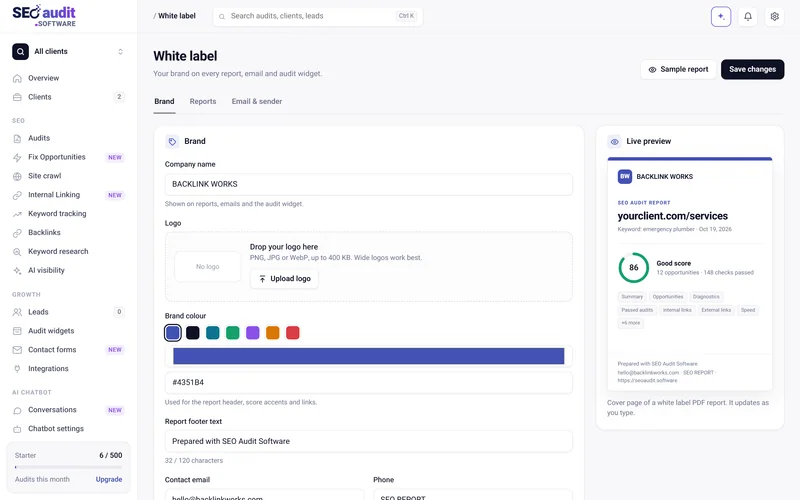
Go to the White Label section to give it a branded look.
You will get a chance to customize the look and feel of the report. Simply submit your company’s logo and details ( name, phone number, header, footer text).
After that is done, download the PDF report to show it to your clients. Or, share them via email.
Step – 4:
PDF report download option is available within the report. Or you can download it from the Audits section.
From the report itself, you can even share it with anyone. You can share it with one person or with up to 10 people at the same time. Just enter the email address and share the PDF SEO Audit report.
And that’s how you can generate Free SEO Audit PDF Report in a minute.
The Benefits of Free Website Audit Report Tool:
Different SEO agencies and marketers are enjoying the sweet fruit of providing SEO audit results to their clients. It is useful and cost-free. The following benefits of such a tool make it worthwhile.
Free of cost:
SEO Audit Software offers a 14-day free trial with no credit card required, so you can test the full reporting workflow before you pay.
Pricing model
The impressive offer of a free trial for 14 days is not the only what this software has to offer. As we have mentioned earlier. This software has been developed keeping entrepreneurs and agencies in mind.
So it has segmented its packages in such a way that complements the agency’s branding needs.
Plans and pricing
Every plan starts with a 14-day free trial, with no credit card required.
SEO Audit Software has five plans, from Starter to Enterprise, and every plan includes white label PDF reports and unlimited lead forms and leads. See current prices and limits on the pricing page.
Agencies that want the tools under their own domain can choose Branded SEO Tools on the Cloud, and teams that want to self-host can buy the open source version for a one-time payment. See the pricing page for current details.
Instant Audit:
Using such auditing and reporting tools, analyzing the SEO activity of multiple websites is a matter of seconds. You just have to input the website URL and keywords to begin the audit.
Complete scan:
This tool runs a 360-degree scan on websites whenever you command for a report. It crawls and analyzes inch by inch. To provide you with an SEO report that will contain facts and statistics. So that you get evidence for every piece of information.
Simple reporting:
A report should be understandable to its users. Because if they don’t understand the report then it will not be of much use.
Starting from the MD of the company to IT expert to mid-level social media manager. Everyone has a different level of understanding ability. That’s why the reports should be easy to understand.
These tools represent a report in the easiest way. Graphical representations, parameters, scores. And side by side shows every performance of your website.
Anyone can understand them at a glance. It lessens the confusion and saves time.
Multilingual SEO Platform:
Your Free SEO Audit Report is now available in your native tongue.
You can switch to any language at any time by selecting one of the 12 available languages in this software.
English, Dutch, Spanish, Italian, French, Portuguese, German, Greek, Swedish, Polish, Norwegian, and Danish are the languages that are available to you here.
Once you’ve changed to a different language, this modification will apply everywhere. Even with the Advanced SEO audit you run, the report will be generated in your chosen language.
Customization is done in a minute:
White label in any of your reports within a minute.
This tool allows you to try various customization options. You can add a logo, information, and footer content in the audit report.
You don’t have to sit down fixing teeny-tiny details of the SEO reports. This reporting tool will handle everything for you.
You can clone the white-label reporting option for every client. No matter if it is 5, 40, or 100. Add personalized comments and insights to each of the reports
Using the white label feature you will give the SEO report your unique branding touch. Just like your business.
This SEO Reporting Tool has everything to create simple, effective, and beautiful SEO reports.
This also shows how to effectively grab the attention of your clients. By seeing the completely branded report, your client will surely appreciate your hard work.
There’s no need to white-label each report separately:
This tool is developed by experts and it shows in the design. It is highly organized and user-friendly. As a result, you can navigate the tool smoothly.
Once you configure the white label option. No need to input every branded detail separately in each report.
All reports will stay consistent in branded nature. Giving you a seamless white-label experience.
You can omit seeing information that is needless for you. You can prioritize the information on the report as per your liking. The configuration panel is designed to be user-friendly.
Mobile Responsive Dashboard:
Now you can generate a free SEO Audit Report in PDF Format using your mobile device.
There’s no need to wait until you get to your house or workplace to access the report.
You can run and get advanced audit reports using your smartphone whether you’re sitting outside or in the car.
Your SEO work is made easier and hassle-free by this incredibly useful tool.
Download Insightful PDF Report:
Not only you can generate white-label reports online. But also download and share PDF reports with your client.
Without wasting unnecessary time on manual reporting. Try and create PDF reports with SEO Audit Software. It helps you automate your reporting and analytics.
You can manage, create and share custom SEO reports in just a few clicks. No there is no drag & drop option available. But the user interface is so simple to use that you don’t need such an option at all.
Such reporting features elevate your SEO performance. Build a strong communication bonding with clients.
Next time you don’t need to rely on any agency for generating such a powerful report.
Paying for the White Label SEO tool is not an expenditure, it’s an investment.
Now, after a free trial, let’s get down to business. Do you believe you can generate SEO Audit Report without professional help?
Agree with this. It will cost you in one way or another. And errors can cost you far more than money.
Considering the free SEO Audit Reporting tool is great to start with. It helps you introduce the powerful advanced reporting feature. That you won’t know otherwise.
Spending some on the right SEO audit reporting tool can save you money. And reputation. All the good things in the long run.
Final Words:
The free SEO Audit report tool is a blessing. Blessing for small agencies, digital marketers, SEO experts, and freelancers. Those who have just begun to report website audits.
Small agencies and newbies won’t like to spend much. They are constantly looking for free options. Tools like the SEO Audit Software platform can be the best pick for them to generate automated, agency-ready PDF audits.
So, invest some time in it and find out what works best for you and your agency.
Frequently asked questions
Can I get an SEO audit report in PDF for free?
Yes, during the 14-day free trial of SEO Audit Software, which needs no credit card. You can run audits, add your branding and download every report as a PDF. The trial limits are listed in how the free trial works. For a quick one-off check, use our free SEO analysis report tool.
What should an SEO audit report PDF include?
A summary score, the issues to fix in order of priority, and sections for on-page tags, content, links, images, load speed, mobile usability and technical and security checks, each with a short note on why it matters and how to fix it. For monthly client reporting, add rankings and traffic. Our SEO report template for clients lists the sections.
Can I put my own logo on the SEO audit PDF?
Yes. Under White label, add your company name, logo, brand colour and contact details. Every new PDF and report email uses them, so clients see your agency, not ours. See our white label SEO reports page.
How long does it take to generate the PDF?
A basic audit usually takes under a minute, and advanced audits with Google Lighthouse take about a minute longer. You can download the PDF as soon as the audit has finished.